Task Stats
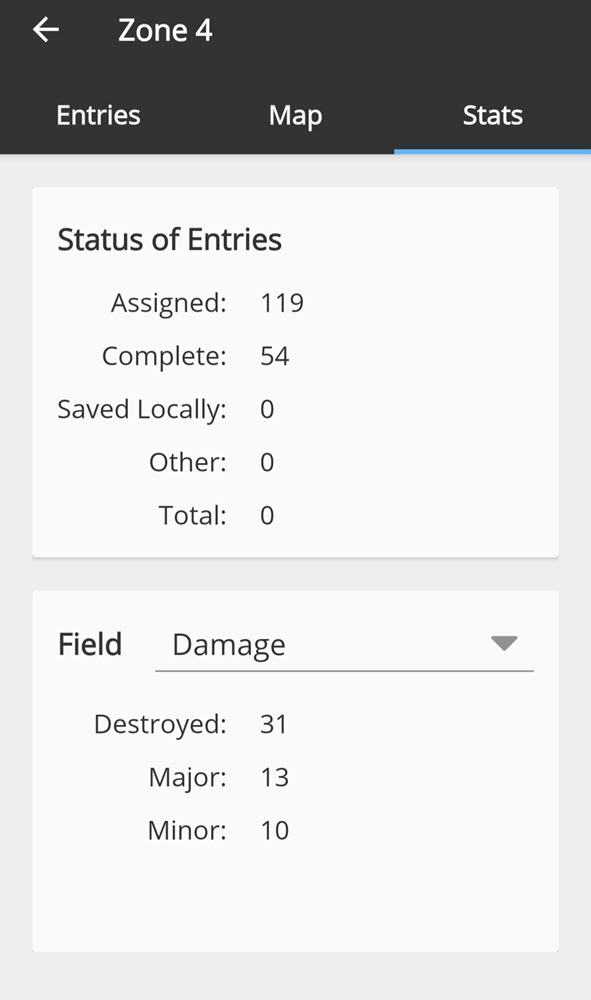
In the Crisis Track mobile app, there are three task tabs that allow you to view different aspects of the task. This page focuses on what you can do in the Stats tab, which displays the status of entries assigned to this task as well as information based on data that has been collected.
To view task entry stats
Review the Status of Entries box. This section contains status information for the entries associated with this task, including how many entries are currently assigned, complete, have been saved locally to upload later, or are of another status.
To filter entry stats
Tap the Field drop-down menu and select a entry field type, for example, Damage or Resident Type. Information about that field will display, showing the stats across all entries associated with the task. If some entries have not been completed or uploaded yet, the information from those entries will not be contributed to the filtered stats.