Google Authenticator
If your organization Official entities, such as public health authorities, healthcare agencies, and corporations. uses Juvare Login Services and configures multifactor authentication (MFA), you must set up and use an additional authentication element to verify your identity when you log in.
Google Authenticator is one option for authenticating through an app on your mobile device. After downloading and setting up the app, Google Authenticator will generate codes or send push notifications An alert, update, advisory, information, drill, or test message that can be sent & received through delivery methods such as email, voice, text, fax, or inbox. when you attempt to log in. You will need to enter the code or respond to the notification to access your Juvare account Used to track and manage users. Accounts differ from your profile, which is used to modify personal settings for using the solution..
Normally, you are prompted set up the authentication method when you activate your account. However, if you already activated your account or want to use a different authentication method, you can access the MFA set-up options through your profile A collection of information that identifies and defines you in the solution. Your profile differs from your account, which is how you log in. settings on https://login.juvare.com.
For more information, see the End-user experience section in Okta's Google Authenticator topic.
To set up Google Authenticator from the welcome email
-
In your email inbox, locate and open the Welcome to Juvare! email.
-
Read the email and, when ready, click Activate Account. In your browser, the JuvareSet up security methods page opens.
-
Below Password, click Set up. The Set up password page opens.
-
Enter a password in the Enter password and Re-enter password boxes.
-
Click Next. The Set up security methods page opens.

-
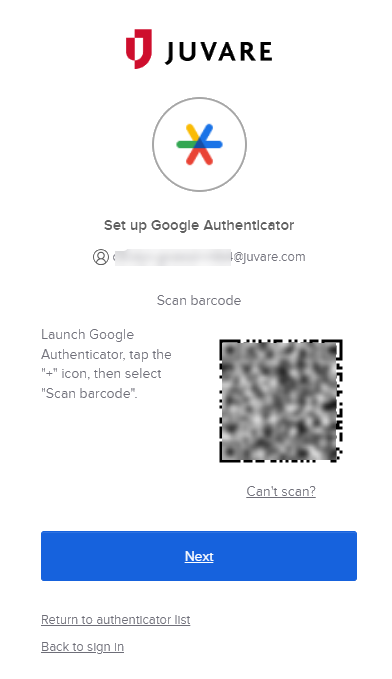
Below Google Authenticator, click Set up. The Set up Google Authenticator page opens.
-
On your mobile device, download and launch the Google Authenticator app.
-
Create and sign in to the account associated with your organization.
-
On the lower right, tap the plus icon +.
-
Tap Scan a QR Code. A new page opens with your camera active.
-
Point the camera at the barcode on your browser page. An account is added to your Google Authenticator app.
If you're unable to scan the barcode, on the browser page click Can't scan? and follow the instructions to enter the code manually.
-
In your browser, click Continue.
-
In the Google Authenticator app on your mobile device, locate the code that corresponds to this account.
-
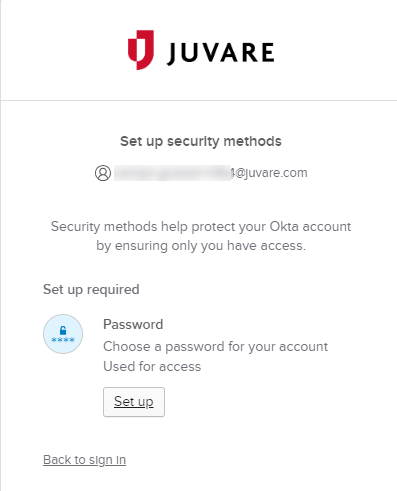
In your browser, enter the code in the Enter code field and click Verify. The Set up security methods page opens.
-
On the lower left, click Back to sign in.
To log in with Google Authenticator
If your organization uses Juvare Login Services with multifactor authentication (MFA), and you have already set up Google Authenticator for your account, you can choose to receive a push notification or enter a code when you log in. You need to respond to the push notification or enter the correct code to access your Juvare account.
-
Navigate to your solution's login page or https://login.juvare.com.
-
On the Juvare Google Authenticator page, do one of these actions.
If you want to receive a push notification:
a. Click Send Push. A push notification is sent to your mobile device.
If you don't respond, the notification expires after five minutes. To receive a new notification, click Send Push again.
b. On your mobile device, launch Google Authenticator. The Did You Just Try to Sign In prompt displays.
c. If the details match your device, tap Yes, It's Me. Your device communicates with Google Authenticator and the Juvare Google Authenticator page on your browser displays a number.
d. On your mobile device, the Verify sign-in screen displays. Tap the code that matches the number displayed on the Juvare Google Authenticator page in your browser.
If you want to enter a code:
a. Click Or enter code.
b. On your mobile device, launch Google Authenticator. Locate the entry for login.juvare.com and confirm that your login email is shown.
If the verification code is hidden, tap it to reveal it. The six-digit code is renewed every 30 seconds. A progress bar indicates how much time is left until a new code is generated.
d. Navigate to the Juvare Google Authenticator page in your browser.
e. Enter the six-digit code and click Verify.