The Response Tracker report allows you to view and print a list of contacts The internal and external people that participate in, might be affected by, or need to be notified about an incident. that have been notified of the test or incident and the status of and response to each notification An alert, update, advisory, information, drill, or test message that can be sent & received through delivery methods such as email, voice, text, fax, or inbox..
This report also lists all individuals you or other users assigned to your Other Contacts to Notify group Comprised of accounts with certain shared characteristics, such as role or location, but not necesarily employer..
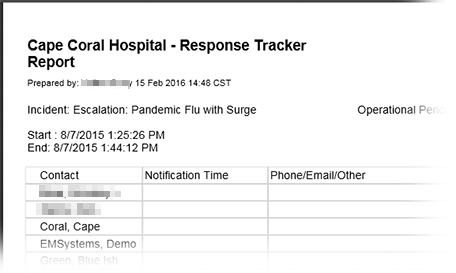
The report includes the name of the user generating the report (Prepared By), the name of the incident, and a list of all operational periods A defined time frame for executing incident objectives and assignments. this incident has gone through. When conducting a notification test, the report includes the start and end date and time of the test (Dates/Times).
Additionally, for each notification, the report includes:
-
Verification Icon – (Notification Test) If the participant confirmed all notifications, the green circle icon appears next to the participant's name, indicating notifications are verified. If the participant confirms only one notification was received, the yellow circle icon appears next to their name. If no notifications are confirmed, the red circle icon appears next to the participant's name.
-
Contact –Contact's name.
-
Notification Time –Date and time the system sent the notification to the contact (24-hour notation).
-
Phone/Email/Other –Phone number, email address, or other contact method the system notified.
-
Type –Type of notification. For an actual incident
A real emergency or event that requires an active response., this might be request availability or assign a position. For a notification test, the type is System Test A non-production incident used to verify system functionality or configuration.. See also About Notifications. -
Confirmed –Indicates whether the recipient confirmed receipt of the notification of this type.
-
Status – For an actual incident, indicates whether the system successfully sent the message. For a test, indicates whether that notification was delivered and received successfully.
More specifically, this report:
| Function | Details |
|---|---|
|
Contains... |
|
|
Can include... |
|
|
Is generated... |
|
|
Is accessed through... |
|
|
Is in standard... |
|