eICS includes a set of features that Facility and Domain Administrators can use to conduct a test of the incident notification An alert, update, advisory, information, drill, or test message that can be sent & received through delivery methods such as email, voice, text, fax, or inbox. system without running an entire drill or exercise A simulated incident used to train personnel and evaluate emergency plans.. The Conduct Test option is available from the Response menu.
Note: Test messages can be sent by phone, text, and/or email.
Benefits
There are several benefits to conducting a System Test A non-production incident used to verify system functionality or configuration..
-
Validate contact methods. Confirmation of receipt of each type of notification helps you verify each contact
The internal and external people that participate in, might be affected by, or need to be notified about an incident. method the user identified in their profile A collection of information that identifies and defines you in the solution. Your profile differs from your account, which is how you log in.. If one or more participants did not confirm receipt of all notifications, you know that contact information may be out of date and needs to be reviewed. -
Resolve contact information gaps. The system proactively supports resolving such gaps. For participants who indicate they did not receive a notification type, the system immediately prompts them to review their profile and make necessary updates. They can also choose to have the notification sent again to verify the new information.
-
Familiarize your users with eICS notifications. Another very useful aspect of the System Test is that it familiarizes your users with the notifications they may receive from eICS, assisting them in becoming more comfortable accessing the system. If new staff have come on board, it can serve to reinforce what they learned in training and, thereby, become more comfortable with the system.
-
Keep staff up-to-date. If you have not had a real life incident and only have the two required exercises each year, a good amount of time can pass between notifications. Performing System Tests periodically throughout the year can serve as a mechanism to keep staff updated.
Process
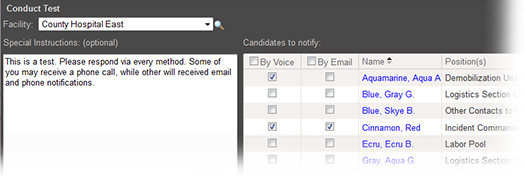
This feature allows you to select contacts from your facility to participate in the test. When you initiate the test, the system automatically attempts to notify all selected participants by email and the first telephone number from their notification preferences. Each type of notification includes any special instructions you entered such as asking the recipient to contact you with any questions.
Each test participant is expected to confirm receipt of these notifications. Therefore, you will probably want to let your participants know ahead of time about the test and the notifications they will receive. When participants respond, the Test Administration page updates to let you know the status of each notification.
The selection behavior in Conduct Test differs from that in actual incidents A real emergency or event that requires an active response. and exercises. When you clear a candidate’s checkboxes for a test, the system does not send any type of notification to that candidate. In an actual incident or an exercise, the system always sends the notification via email.
Participation
As a user, you may be asked to participate in a system test.
Participating in the test is important to the operation and success of your incident command system A standardized framework for managing emergency response activities. solution. Your participation can aid your administration and organization Official entities, such as public health authorities, healthcare agencies, and corporations. in testing the notification system. As such, you may be expected to confirm receipt of voice notifications, email notifications, or both. If you receive a test notification, respond appropriately as you would if an actual incident were occurring.