During planning, your facility may construct multiple plans. While only one plan can be active at any time, being able to set up additional plans supports a facility's transition from one plan to another.
Exercise A simulated incident used to train personnel and evaluate emergency plans. caution when activating a plan. Only one plan can be active at a time. If you activate a new one, you are automatically deactivating the existing plan. Ensure you have specified all details of a plan (such as files, the ICS chart and chain of command The reporting structure that defines who supervises each ICS position., depth charts A list of qualified personnel who can fill an ICS position during an incident., and incident response guides A predefined guide containing objectives, tasks, files, and resources for a specific incident.) before implementing (activating) it.
To activate a plan
-
On the main menu, point to Planning and click Plan Summary. The Summary page opens.
-
Select the domain or facility in Summary for.
-
Select the plan.
-
On the left, select (plan name) Plan Summary. General details appear on the right.
-
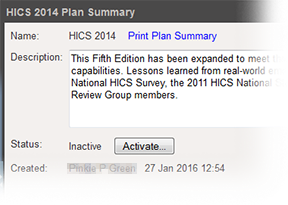
On the right, click Activate in the Status field. A window opens asking you to confirm this action.
-
Click Yes.
Related Concepts