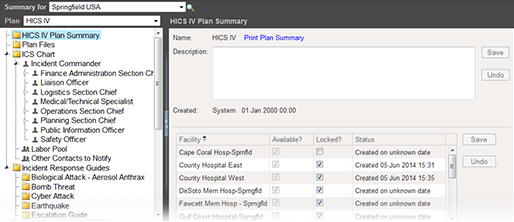
As Domain Administrator, you decide which facilities have access to plans during planning. If you make a plan available to a facility, they can construct a new plan based on that plan's configuration. You can also control whether a facility can change the basic structure of the plan's ICS chart. When locked, users cannot change the chart, the chain of command or position names.
Make a Plan Available
If a facility has created a plan based on a template, you cannot change the availability of the domain-level configuration. The date and time the facility created the plan appears in the Status column of the (plan name) Plan Summary area. If the exact date is not known, the column contains Created on unknown date.
To manage plan availability
-
On the main menu, point to Planning and click Plan Summary. The Summary for (facility/domain) page opens.
-
Select the domain from the Summary for drop-down list.
-
Select the plan.
-
On the left, select (plan name) Plan Summary. The right area shows general details about the plan and facilities in your domain.
-
To make the plan available to a facility, select its associated Is Available? checkbox.
-
To make the plan unavailable to a facility, clear its associated Is Available? checkbox.
-
Click Save.
Related Concepts