Feature Updates
Juvare Login Services
 Dec 6, 2023
Login Page
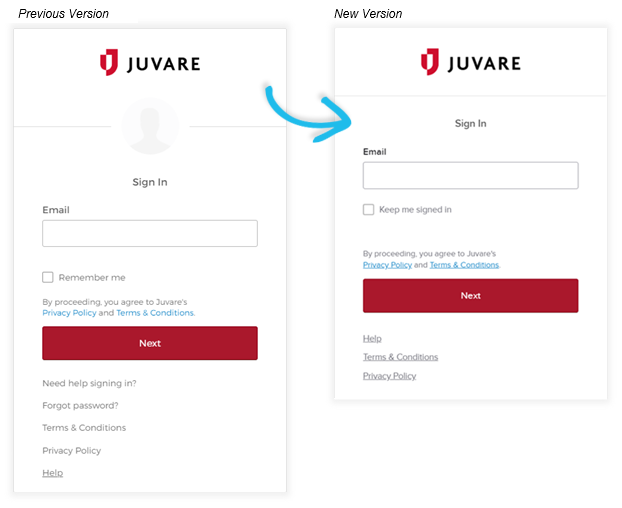
The look and feel of the login page were updated to streamline access to your account. If your organization uses Juvare-supported single sign-on (SSO), you will see the following updates:
-
You will need to enter your email address before accessing the Forgot password? link. Entering your email ensures that password reset requests are appropriately routed.
-
Your profile picture no longer displays.
Account Activation
The account activation process has been enhanced in the following ways:
-
You are no longer required to select an account image.
-
You are notified during the first step of account activation if you must set up multiple factors to authenticate your account. Your password is considered the first factor in a multifactor authentication setup.
JX Collaborate
Oct 9, 2024
Delete a Chat
In response to client requests, you can now delete chats. This option is in addition to your ability to archive chats.
May 9, 2024
User Groups
Currently available only with WebEOC, user groups are a way to manage access to the chats, files, and other information shared within a JX Collaborate network. As an administrator, you can create user groups by selecting people within your organization using any combination of groups, positions, and users. Then, you can assign user groups to networks or make them Public, allowing people from other organizations to view and add that group to networks.
User groups will be available for other solutions in the future.
Resolutions
-
An issue in which the Networks sidebar did not display correctly for some WebEOC users was resolved.
-
An issue that sometimes prevented phone numbers from displaying when viewing organization contacts was resolved.
-
When creating or deleting networks as a member of a large organization, an issue that occasionally caused the Networks page to stop responding was resolved.
Notify Service
Nov 19, 2024
Text Message Consent
Based on your organization’s policy, recipients that are required to consent to text messages now need to reply to the first message with the word START. The word YES will also work for now, but ultimately, it will be discontinued. Recipients can opt out of text messages at any time by replying STOP and resubscribe by replying START.