User Roles/Rights Grid Report
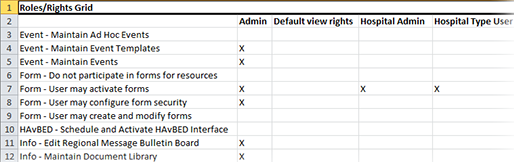
If you have the appropriate rights, you can generate the User Roles/Rights Grid. This report Provides specific information about statuses and details, notifications, forms, templates, snapshots, and roles/rights in EMResource. lists feature and/or functionality rights available in EMResource, and the roles Assigned to determine which features and functions are available to users. to which those rights are assigned. It also includes status-related rights, such as Update Status - Pediatric and View Status - Monitored Beds.
To generate the User Roles/Rights Grid
-
In the main menu, click Report, then click User Roles/Rights Grid. The Roles/Rights Grid page opens.
-
Click Generate Report to generate the XLSX spreadsheet file. The report is automatically downloaded according to your browser settings.
Be aware that for Excel, EMResource generates .xlsx files and does not support the older .xls format.
The report will generate a list of features, pages, and actions that can be performed in EMResource in the first column, followed by the roles set up for your instance of EMResource, as configured by your system administrator, in the subsequent columns. If a role has the appropriate rights to view that page or perform that action, an X will appear in the cell.