Resource Status Partner Interoperability
This guide describes the secure web service interface that Juvare provides to enhance solution interoperability for its EMResource clients and partners. With this web service, data is communicated using the REST/JSON or SOAP/XML method.
It is assumed that a business agreement between Juvare and the business partner is in effect and the specifics of the data to be shared are understood by all parties.
The APIs necessary to read and/or write resource statuses are documented below.
 Get Resource Status v2 API
The Get Resource Status v2 API is used to poll for data as needed or on an ongoing basis. The request can be sent in JSON (preferred) or XML (deprecated) format. The response is provided in the same format as the request.
REST/JSON (preferred)
To receive a JSON response, the following information needs to be specified in your message.
Authorization
Basic Auth: Username and Password will be provided in a separate document
Address and Action Name
https://emresource.juvare.com/partnergateway/serviceendpoint/{Action Name}/{Interface Key} Your Action Name and Interface Key will be provided in a separate document.
HTTP Method: GET
Body
The body is not required for this request.
SOAP/XML (deprecated)
To receive an XML response, the following information needs to be specified in your message.
Authorization
Basic Auth: Username and Password will be provided in a separate document
Address
https://emresource.juvare.com/partnergateway/PartnerEndpoint
Your Action Name and Division Name will be provided in a separate document.
HTTP Method: POST
SOAP Header (Example)
                <?xml version="1.0" encoding="utf-8"?>
                <requestDefinition actionName='your action name' systemName='EMResource' divisionName='your division name'>
                </requestDefinition>
Body
Body is not required for this request.
Example
For an example of the Postman or .NET file, contact Juvare.
Submit Resource Status API
The Submit Resource Status API is an asynchronous process. If you want to perform the same actions using a synchronous process, refer to POST Resource Status API Overview.
The Submit Resource Status API is used to upload status data to Juvare. The HTTP request you send to Juvare's API includes a payload with the new status values. The HTTP response from Juvare provides general information about your submission. Data validation and other errors are provided via email notification or by logging into EMResource.
The interface supports updates of one or more resources and one or more status types for each resource. It is not necessary to update the same status types for each resource. The API accepts all EMResource data types: text, numeric, date, multi-status, and NEDOCS.
To configure the web service, work with Juvare to obtain a system ID and password, along with the Action Name and Interface Key request definition arguments.
REST/JSON (preferred)
To send a message using JSON, the following information must be specified.
Authorization
Basic Auth: Username and Password will be provided in a separate document
HTTP Headers
Content-Type: application/json Accept: application/json
Address and Action Name
https://emresource.juvare.com/partnergateway/serviceendpoint/{Action Name}/{Interface Key} Your Action Name and Interface Key will be provided in a separate document.
HTTP Method: POST
Body (Example)
                {
                    "resources": [
                        {
                            "id": "your resource ID",
                            "statuses": [
                                {
                                    "statusName": "All_Hospital_Beds",
                                    "statusValue": "10",
                                    "comments": "testing"
                                },
                                {
                                    "statusName": "STAFF_CRIT_SHORTAGE_1_WEEK",
                                    "Yes",
                                    "reason": "Physicians",
                                    "comments":"testing"
                                },
                                   {
                                       "statusName": "othsuppshortage",
                                    "statusValue": "short on syringes",
                                    "comments": "testing"
                                },
                                   {
                                       "statusName": "NEDOCS",
                                    "nedocs": {
                                           "edPatients": 1,
                                        "edAdmits": 2,
                                            "lastDoorToBedTime": 3,
                                       "criticalCarePatients": 4,
                                       "longestEdAdmit": 5,
                                       "edBeds": 6,
                                       "inPatientBeds": 7,
                                       "chargeNurse": "John Doe"
                                },
                                "comments": "testing"
                               }
                         ]
                       }
                   ]
              }
SOAP/XML (deprecated)
To submit an update using XML, the following information must be specified.
Authorization
Basic Auth: Username and Password to be provided in a separate document
HTTP Headers
Content-Type: text/xml
Address
https://emresource.juvare.com/partnergateway/PartnerEndpoint
HTTP Method: POST
SOAP Header (Example)
                        <?xml version="1.0" encoding="utf-8"?>
                        <requestDefinition actionName='your action name' systemName='EMRESOURCE' divisionName='your division name'>
                        </requestDefinition>
Body (Example)
                        <resources>
                            <resource id=' d767263e-49ee-45d0-9038-8adf1810bb52'>
                                <statuses>
                                <status>
                                <statusName>All_Hospital_Beds</statusName>
                                <statusValue>10</statusValue>
                                <comments>testing</comments>
                                </status>
                                <status>
                                <statusName>STAFF_CRIT_SHORTAGE_1_WEEK</statusName>
                                <statusValue>Yes</statusValue>
                                <reasons>
                                <reason>Nurses</reason>
                                <reason>Physicians</reason>
                                </reasons>
                                <comments>testing</comments>
                                </status>
                                <status>
                                <statusName>othsuppshortage</statusName>
                                <statusValue>short on syringes</statusValue>
                                <comments>testing</comments>
                                </status>
                                </statuses>
                                </resource>
                                </resources>
Values
|
Attribute |
Format |
Comment |
|---|---|---|
|
Action Name |
Text |
Uniquely identifies the web service and its scope |
|
Division Name |
Text |
|
|
Username |
Text |
Username for authentication |
|
Password |
Text |
Password for authentication |
|
Resource ID |
GUID |
Unique identifier for each resource (for example, facility) |
|
Status Name |
Text |
Unique identifier for type of status (for example, licensed beds) |
|
Status Value |
Number, Text, or Multi |
Value of the status (for example, 10 ED beds) |
|
Comment |
Text |
Freeform comments that supplement the status value (optional) |
|
Reason |
Multi |
Reason for Status Value (optional, where applicable) |
Example
For an example of the Postman file, contact Juvare.
Data Validation
When sending data through the Submit Resource Status API, you can log into EMResource to verify the information was received. To do this:
-
Go to EMResource and log in with your web service credentials.
-
Review the Jobs list to review the status of your submission.
You may also receive email notifications with this information. You may request this through your Juvare representative.
Troubleshooting
If you receive a message when you submit the API, locate it in the examples below and attempt to resolve the issue. If you need assistance, contact Juvare.
For more information, contact the Juvare Support Center at support@juvare.com or 877-771-0911.
Response includes Status Failures
In the example below, it states there were 744 status failures even though it is likely everything was sent successfully.
                <resourceFailures>0</resourceFailures>
                <resourceSuccesses>9</resourceSuccesses>
                <statusFailures>744</statusFailures>
                <statusSuccesses>363</statusSuccesses>
This typically happens when numeric status types are updated through the API but the updated value is the same as the previous value. In this case, EMResource displays the new timestamp from your message and the value remains as it was before.
Typically, there is not an issue unless a true error message is received. These can be found in the error tag of the response message.
Error Message: SOAP-ENV:ServerEMSystem is unable to process this request
There are two possible reasons for this error:
-
The web service username or password contains a forbidden special character.
-
More than one of the same Standard Status Type is used in the region. If you receive this message, contact Juvare.
Error Message: SOAP-ENV:ServerUser is not authorized for the target
This message likely appears because the web service user is not listed in the interface. If you receive this message, contact Juvare.
Error Message: Please specify a username and password following the HTTP Basic Authentication
The URL listed in your message is likely pointing to the wrong address. If you receive this message, contact Juvare to verify the URL.
Error Message: User May Not Update Status
There are several possible reasons for this error:
-
Your user is attempting to update a status type that it is not authorized to update.
-
The status type is not currently being queried by the region (for example, it is an event only status type).
-
The status type is being queried by the region, but the event does not include that resource. If you receive this message, contact Juvare.
Status Reasons are not displaying in EMResource
If you notice that status reasons are not being sent to EMResource, contact Juvare.
NEDOCS score is not being updated in EMResource
Although the individual NEDOCS data elements you are sending may differ from a previous submission, if the resulting NEDOCS score is the same as the previous value, EMResource will continue to display the previous timestamp. EMResource will only display a new timestamp when your submission results in a new NEDOCS score.
Interface Summary
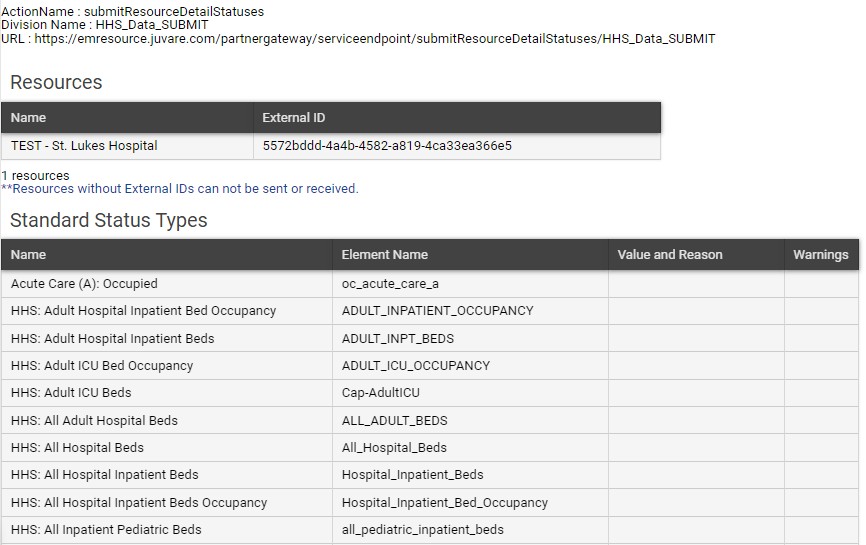
Your web service username and password can be used to access the EMResource Interface Summary, which includes the following information:
-
Action Name
-
Division Name (also known as the Interface Key)
-
Address or URL
-
Participating Resources and corresponding IDs
-
Status Names
-
Multiple choice options for multichoice statuses
-
Reasons for multi-choice status types that have them
To access the Interface Summary
Go to EMResource and log in using the web service username and password provided by Juvare.
-
On the upper left, in the Main Menu, select Setup and then select InterfaceDashboard.
-
For interface, select Summary.
-
Review the interface information on this page and, as needed, update the details.