Resource Status API
This guide describes the secure web service interface A premium feature that allows you to share data between EMResource and a third-party solution. that Juvare provides to enhance solution interoperability for its EMResource clients and partners. With this web service, data is communicated using the REST/JSON method.
It is assumed that a business agreement between Juvare and the business partner is in effect and the specifics of the data to be shared are understood by all parties.
The APIs necessary to read and/or write resource statuses A resource's current operation level or limitations. Sometimes also referred to as a facility status. are documented below.
Get Resource Status API
The Get Resource Status API is used to poll for data as needed or on an ongoing basis. It extracts data from EMResource
Request
The following information needs to be specified in your HTTP request.
Address, Action Name, and Interface Key
https://emresource.juvare.com/partnergateway/serviceendpoint/{Action Name}/{Interface Key}
Your Action Name and Interface Key will be provided in a separate document.
HTTP Method: GET
Authorization
Basic Auth: Username and Password will be provided by Juvare.
Body
The body is not required for this request.
Response
The response is a JSON array with one entry for each resource. Each resource contains a section with resource information (name, address, geolocation, resource type, and unique identifier) followed by a status section with a list of data for each status type.
EMResource can be configured to send an email with the results of Submit Resource Status invocations.
| Field | Description |
|---|---|
| name | The name of the resource. |
| type | The resource type of the resource. |
| identification.id.type |
Unique identifier type. Values can be:
|
| identification.id.value | Unique identifier value. |
| Field | Description |
|---|---|
| statusTypeId |
Unique alphanumeric identifier for each data element. This ID is region specific and immutable. |
| statusTypeName | Name of the status type (for example, "Facility Status"). This name is region specific. It can be changed in the system at any time. |
| standardStatusTypeID | Unique alphanumeric identifier for type of standard status (for example, FacilityStatus). This ID is the same for a common data element across all EMResource customers and regions. It is immutable. |
| standardStatusTypeName | Name of standard status type (for example, "Facility Status"). |
| statusValueType |
Data type of the status type. Values can be:
|
| statusValue | Current value of the status (for example, "Compromised" Facility Status). |
| standardStatusValue |
Value of the standard status (for example, "Compromised"). Valid only for multiple choice status types. |
| statusReasonValue |
Reason for Status Value. Valid only for multiple choice status types. |
| standardStatusReasonId |
Unique identifier for reason mapped to Juvare defined global list of reasons across all clients. Valid only for multiple choice status types. |
| standardStatusReasonValue |
Name of reason mapped to Juvare defined global list of reasons across all clients. Valid only for multiple choice status types. |
| colorCode | The color associated with this status value. |
| comments | Freeform comments that supplement the status value (optional). |
| lastUpdated | The timestamp when the status type was last updated. |
| lastUpdatedBy | The individual who last updated the status type. |
Response Sample
                [
                    {
                        "details": {
                            "address": {
                                "city": "Rutherford",
                                "county": "Bergen",
                                "state": "NJ",
                                "street": "175 Santiago Ave"
                        },
                        "group": "Buckingham Assisted Living",
                        "identification": {
                            "id": [
                            {
                                "type": "EMR",
                                "value": "331509"
                            }
                        ]
                    },
                    "lastUpdated": "2025-08-06T13:35:42.359Z",
                    "location": {
                        "latitude": 40.83505,
                        "longitude": -74.113922
                    },
                    "name": "Buckingham Assisted Living Facility",
                    "type": "Assisted Living"
                    },
                    "statuses": [
                        {
                            "colorCode": "green",
                            "comments": "",
                            "lastUpdated": "2026-01-21T22:11:20.634Z",
                            "lastUpdatedBy": "PrinceCharles",
                            "standardStatusTypeId": "NEDOCS",
                            "standardStatusTypeName": "NEDOCS",
                            "statusTypeName": "NEDOCS",
                            "statusValue": "15 - Normal1",
                            "statusValueType": "NEDOC"
                        },
                        {
                            "colorCode": "white",
                            "comments": "",
                            "lastUpdated": "2026-07-27T20:15:48.050Z",
                            "lastUpdatedBy": "PrinceCharles",
                            "statusTypeId": "AdministratorName",
                            "statusTypeName": "Administrator's Name",
                            "statusValue": "Philip Mah",
                            "statusValueType": "TEXT"
                        },
                        {
                            "colorCode": "orange",
                            "comments": "Renovations",
                            "lastUpdated": "2026-07-27T20:42:01.620Z",
                            "lastUpdatedBy": "PrinceCharles",
                            "reasons": [
                                {
                                    "statusReasonValue": "Building Renovation",
                                    "standardStatusReasonId": "Security_Concern",
                                    "standardStatusReasonValue": "Security Concern"
                                }
                            ],
                            "standardStatusTypeId": "FacilityStatus",
                            "standardStatusTypeName": "Facility Status",
                            "standardStatusValue": "Compromised",
                            "statusTypeName": "Facility Status",
                            "statusValue": "Compromised",
                            "statusValueType": "STATS"
                        },
                        {
                            "colorCode": "green",
                            "lastUpdated": "2026-01-13T18:38:43.511Z",
                            "lastUpdatedBy": "system",
                            "standardStatusTypeId": "NEDOCS",
                            "standardStatusTypeName": "NEDOCS",
                            "statusTypeName": "Event Only NEDOCS",
                            "statusValue": "0 - Normal1",
                            "statusValueType": "NEDOC"
                        }
                    ]
                }
            ]
The Submit Resource Status API is an asynchronous process. If you want to perform the same actions using a synchronous process, refer to Post/Submit Resource Status API Overview.
The Submit Resource Status API is used to upload status data to Juvare. The HTTP request you send to Juvare's API includes a payload with the new status values. The HTTP response from Juvare provides general information about your submission. Data validation and other errors are provided via email notification or by logging into EMResource.
The interface supports updates of one or more resources and one or more status types for each resource. It is not necessary to update the same status types for each resource. The API accepts all EMResource data types: text, numeric, date, multi-status, and NEDOCS.
To configure the web service, work with Juvare to obtain a system ID and password, along with the Action Name and Interface Key request definition arguments. To send a message, the following information must be specified.
Request
Address and Action Name
https://emresource.juvare.com/partnergateway/serviceendpoint/{Action Name}/{Interface Key} Your Action Name and Interface Key will be provided in a separate document.
HTTP Method: POST
Authorization
Basic Auth: Username and Password will be provided in a separate document
HTTP Headers
Content-Type: application/json Accept: application/json
Body (Example)
                {
                    "resources": [
                        {
                            "id": "your resource ID",
                            "statuses": [
                                {
                                    "statusName": "All_Hospital_Beds",
                                    "statusValue": "10",
                                    "comments": "testing"
                                },
                                {
                                    "statusName": "STAFF_CRIT_SHORTAGE_1_WEEK",
                                    "Yes",
                                    "reason": "Physicians",
                                    "comments":"testing"
                                },
                                   {
                                       "statusName": "othsuppshortage",
                                    "statusValue": "short on syringes",
                                    "comments": "testing"
                                },
                                   {
                                       "statusName": "NEDOCS",
                                    "nedocs": {
                                           "edPatients": 1,
                                        "edAdmits": 2,
                                            "lastDoorToBedTime": 3,
                                       "criticalCarePatients": 4,
                                       "longestEdAdmit": 5,
                                       "edBeds": 6,
                                       "inPatientBeds": 7,
                                       "chargeNurse": "John Doe"
                                },
                                "comments": "testing"
                               }
                         ]
                       }
                   ]
              }
Response (Example)
        {
            "exposition": {
                "resources": [
                    {
                        "details": {
                        "errors": [],
                        "totalSent": 0,
                        "totalUpdated": 0
                    },
                    "id": "3e42d526cf8a474d9d20b94862032efe",
                    "name": "The Ballroom",
                    "regionName": "Buckingham Palace",
                    "statusDetails": {
                        "errors": [],
                        "totalSent": 2,
                        "totalUpdated": 2
                    },
                    "updateType": "U"
                }
            ]
            },
            "summary": {
                "resourceFailures": 0,
                "resourceSuccesses": 1,
                "statusFailures": 0,
                "statusSuccesses": 2
            }
        }
Data Validation
When sending data through the Submit Resource Status API, you can log into EMResource to verify the information was received. To do this:
-
Go to EMResource and log in with your web service credentials.
-
Review the Jobs list to review the status of your submission.
You may also receive email notifications with this information. You may request this through your Juvare representative.
Post Resource Status API
The Post Resource Status API is the same as Submit Resource Status, but is synchronous. Post is acceptable for a small data update (for example, one resource with fewer than 50 status values). Larger volumes of data should use the Submit Resource Status API to avoid long-running requests.
Troubleshooting
If you receive a message when you submit the API, locate it in the examples below and attempt to resolve the issue. If you need assistance, contact Juvare.
For more information, contact the Juvare Support Center at support@juvare.com or 877-771-0911.
Response includes Status Failures (Post Resource Status API only)
In the example below, it states there were 744 status failures even though it is likely everything was sent successfully.
                        {
                        "resourceFailures": 0,
                        "resourceSuccesses": 9,
                        "statusFailures": 744,
                        "statusSuccesses": 363
                        }
This typically happens when numeric status types are updated through the API but the updated value is the same as the previous value. In this case, EMResource displays the new timestamp from your message and the value remains as it was before.
Typically, there is not an issue unless a true error message is received. These can be found in the error tag of the response message.
Error Message: Please specify a username and password following the HTTP Basic Authentication
The URL listed in your message is likely pointing to the wrong address or you failed to submit a valid username and password. If you receive this message, contact Juvare to verify the URL.
Error Message: User May Not Update Status
There are several possible reasons for this error:
-
Your user is attempting to update a status type that it is not authorized to update.
-
The status type is not currently active in the region (for example, it is an event only status type).
-
The status type is being queried by the region in an event, but the event does not include that resource. If you receive this message, contact Juvare.
Status Reasons are not displaying in EMResource
If you notice that status reasons are not being sent to EMResource, contact Juvare.
NEDOCS score is not being updated in EMResource
Although the individual NEDOCS data elements you are sending may differ from a previous submission, if the resulting NEDOCS score is the same as the previous value, EMResource will continue to display the previous timestamp. EMResource will only display a new timestamp when your submission results in a new NEDOCS score.
Interface Summary
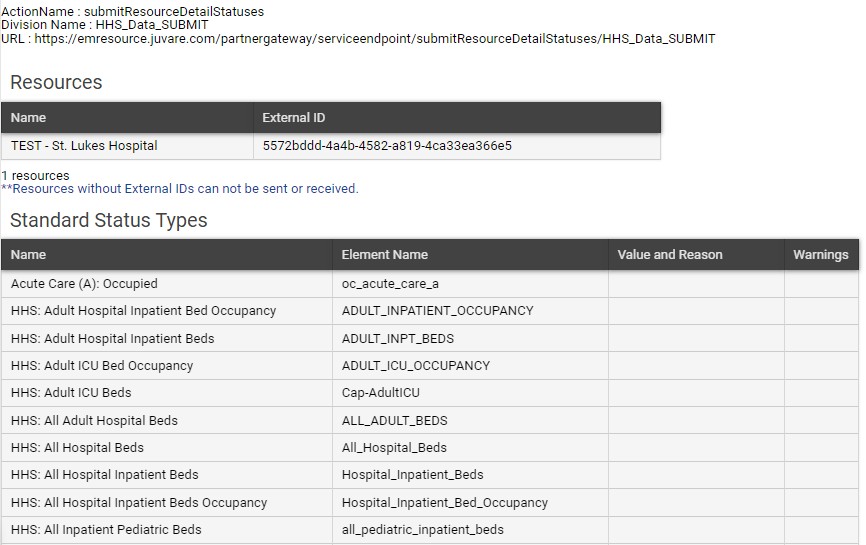
Your web service username and password can be used to access the EMResource Interface Summary, which includes the following information:
-
Action Name
-
Division Name (also known as the Interface Key)
-
Address or URL
-
Participating Resources and corresponding IDs
-
Status Names
-
Multiple choice options for multichoice statuses
-
Reasons for multi-choice status types that have them
To access the Interface Summary
Go to EMResource and log in using the web service username and password provided by Juvare.
-
On the upper left, in the Main Menu, select Interfaces, then select Multi-Region Interface.
-
For your interface, select Summary.
-
Review the interface information on this page and, as needed, update the details.