EMResource 4.41 Release Notes
These notes describe updates in the EMResource 4.41 release scheduled for Wednesday, April 22, 2026. More information is available in this help center or by contacting the Juvare Support Center at +1 (877) 771-0911 or support@juvare.com.
New Features
New Dashboard Widgets
We’re excited to introduce seven new dashboard Allow people to quickly review important information about resources and status types, and may be personal, shared, or global. widgets Components added to dashboards to organize, analyze, and present information about resources and status types. that make it easier to build dashboards tailored to your operational needs. Contact your Customer Success Manager or Account Manager if you’re interested in taking advantage of this new functionality.
Overdue Status 
This new widget lets you display a list of resources based on resource type Categories used to divide and distinguish resources. or resource group Comprised of resources that share one or more characteristics., with one or more overdue statuses that show the total number overdue for each resource. The numbers are clickable to allow you to drill down to the exact statuses that are overdue and, with update rights, you can update the status immediately from the widget. This feature was added based on client feedback submitted through Juvare Ideas.
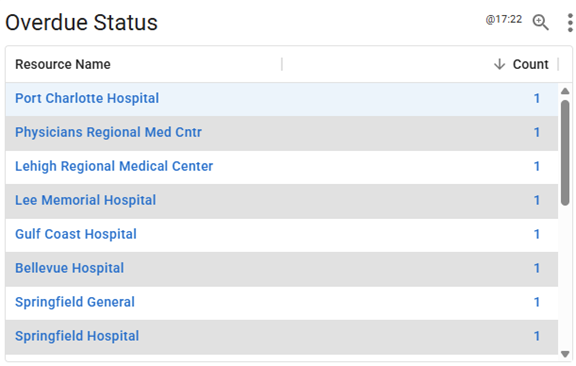
When you drill down, you see detailed status information for the selected resource, including status type Custom fields that track information about resources. This is region-specific and are unique fields., values, and timestamps.

Additional Dashboard Widgets
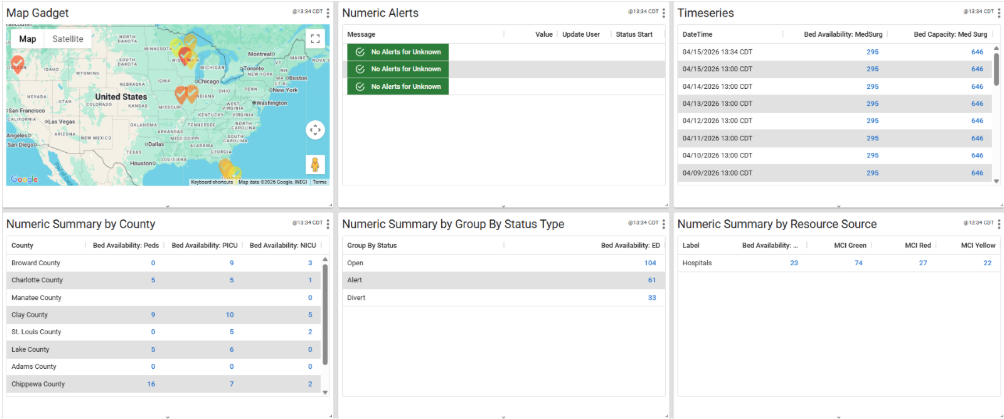
Along with Overdue Status, several additional widgets are available to help you monitor and analyze your data in various ways:
-
Map Widget: Lets you to display resources in a geographical map. Each resource is marked with an icon that changes color based on the status type(s) chosen and the current status.
-
Numeric Alerts: Provides you with the ability to define your own alerts for specific Status Types and custom thresholds for both warning and danger levels.
-
Time Series: Displays data based on Resource Type or Group for specific Status Types for various time interval options: Every hour over 1 day, Every 4 hours over 7 days, Every 8 hours over 14 days, Every 24 hours over 30 days. You can also choose to display minimum value, average, maximum value, or total.
-
Numeric Summary by County: Displays a numeric summary of selected status types, grouped by county.
-
Numeric Summary by Status Type: Displays a numeric summary of selected status types, grouped by status type values (for example, Emergency Department statuses such as Open, Alert, or Divert).
-
Numeric Summary by Resource Source: Displays a numeric summary of selected status types, grouped by resource group or resource type (for example, totals for hospitals within each resource group).
Selective Voice Recipient Configuration
This feature introduces a new user right that gives administrators control over which users can subscribe to voice notifications, providing greater oversight of telecom costs. This feature was added based on client feedback submitted through Juvare Ideas.
CAD API Enhancement
The CAD Integration lets you track the real-time geolocation and status of individual ambulances as resources viewable in tabular and map views A region's default map view, which shows the location of resources set by the regional administrator, and their resource status., dashboards, and reports Provides specific information about statuses and details, notifications, forms, templates, snapshots, and roles/rights in EMResource.. This is an optional enhancement to the existing CAD API, which already calculates ambulance en route/arrived counts and patient offload times by hospital. Contact your Customer Success Manager or Account Manager to learn more.
New User Notification
A new notification has been created to alert administrators or designated users when a new user is created in a region.
Resolutions
-
Resolved an issue where High Contrast view caused certain colors to not display correctly.
Previous Versions
Release notes for previous versions are available here.