Manage Client Labels
As Region Administrator, you can set up Client Labels Used to classify and locate specific types of patients. that you can use to categorize patients. This can help you quickly locate a subset of patients.
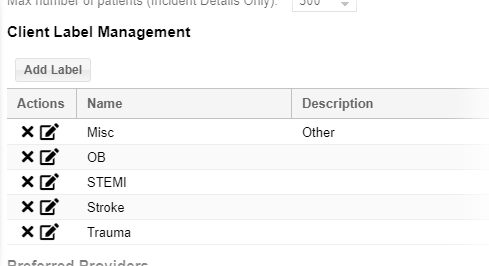
Consider using them for:
-
Special patient needs
-
Emergency worker identification, such as fire department, EMS, nurse
-
Bioterrorism agents
To manage labels
-
On the upper right, click System Settings.
-
On the left, under OtherSettings, click Regional Settings . The Regional Settings page opens.
-
To add a label, scroll down to the Client Label Management section and:
-
Click Add Label. A new row opens in the table.
-
Enter the label's Name and Description.
-
Click Update. The table shows the new label.
-
-
To edit a label:
-
Locate the label and click its edit icon. The row becomes editable.
-
Change the label's Name and/or Description.
-
Click Update.
-
-
To delete a label, locate it in the list and click its delete icon.
Deleting permanently removes the label. You cannot undo this action.
- Click Save.
Related Concepts