Locate
The Locate tab allows you to search for a patient or client.
While any authorized user can use the Locate tab, this feature is specifically designed for users who should have limited access to client records and their PHI. For example, Family Reunification roles use this tab to locate a patient or client to determine where they are, both physically and within the tracking process. This is essential to the process of reuniting families and friends during and after an incident or evacuation.
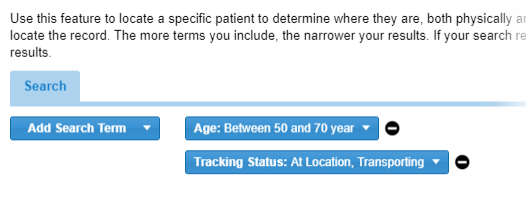
Since retrieved records contain protected health information (PHI), the locate function is not designed for expansive searches that result in many patient and client records. Instead, you must attempt to locate the exact record you need by being very specific in your search criteria. If your search retrieves more than 25 records, the system does not display them and requires you to refine your search.
You also have the option of using the Quick Search feature. When you scan a tracking ID or enter a name or ID in the field and click Search, the Locate tab opens to show your results.
For more information on PHI, refer to Protecting Information.
 Criteria
Since this tab is generally used to locate a single client, you can use many client record details as your search criteria. The more search terms you specify, the narrower your search results. The narrower the search, the more likely it is to yield results you can view.
You can search on a single search term and criterion. In the following example, you select Tracking Status, and then specify that you want to view only patients who are currently being transported.
That would likely result in more than 10 records, so you add more terms. You have heard the client is female, about 65 years old, and was likely involved in a particular incident. The result is a single client record.
You can also specify multiple values for a single search term. For example, you are not certain which incident the client was involved in, so you include multiple incidents.
Options
If you are authorized to locate and view archived and deleted clients, these record options are available under the Search button.
Select the checkboxes for the appropriate record statuses.
Search Results
After you click Search, the page shows the patient record that matches your search criteria.
You can do the following in this page:
-
To refine your criteria, click Refine Search. The page shows the criteria you specified. Add to it or change it, as appropriate.
-
To start a new search, click New Search. The page shows a brand new search page.
-
From the results page, you may be able to work with patient records, depending on your role and rights.