EMTrack Mobile

|
EMTrack™ Mobile is an essential tool for emergency medical technicians (EMTs), first responders, and clinicians who work on site at incidents and events. The mobile app allows you to gather critical patient data on your iOS and Android™ device with a key subset of EMTrack incident response functions. |
Direct integration to your EMTrack solution means data entered through the mobile app is automatically encrypted and uploaded. EMTrack Mobile runs in Wi-Fi and cellular modes. In addition, it works in offline mode when you do not have Internet or network connectivity. In this case, encrypted data is stored on your mobile device until connectivity is restored. Depending on your role and rights in EMTrack, the app allows you to:
-
Scan and manually enter demographic, location
 Generally refers to the region or to a division, such as a provider facility or mobile provider. Every user is granted access to at least one location., and medical information about patients, people, pets, and property to complete patient intake forms designed for use on mobile devices.
 -
Send, receive, and manage incoming patient notifications (IPNs) to communicate patient condition with destination facilities and dispatch; includes two-way in-app messaging that is associated with the patient record
Patient, client, or relative record containing information entered during intake.. -
Start and stop timed patient runs through daily tracking
Allows you to control how tracking numbers are generated when adding patients..
|
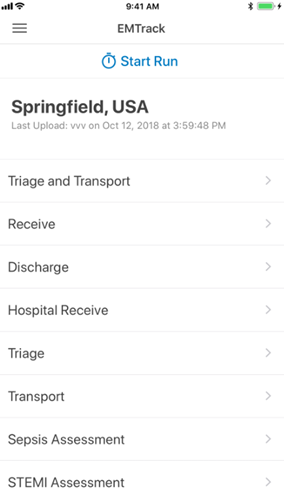
For example, as a responder, you arrive at an incident and are assigned the task of gathering data on the injured. When you open EMTrack Mobile, the incident and the default location appear at the top of the form. Tap the Triage form to open it. Complete the form by entering the required and any supplemental information. Alternatively, you can scan the patient’s triage tag by tapping Scan and pointing your device’s camera at the triage tag. The app automatically focuses on the bar code, scans it, and captures the data. The form displays a message that the record has been scanned and lists the ID number at the bottom of the screen. The appropriate fields in the form are cleared so that you can immediately scan the next triage tag. In another example, if you are responsible for transporting evacuees from the scene, tap the Transport form and use it to capture the evacuee’s destination, mobile provider |
Supported Devices
The EMTrack mobile app works on the following devices:
-
Apple®, iOS 11 or higher
-
Android™ 5.0 or higher
Getting Started
In order to use EMTrack Mobile on your an iPhone® or Android device, you must have valid EMTrack login credentials. A username and password or personal identification number (PIN) can be used for quick access to the mobile app. Biometric login options, such as touch and facial recognition, are also available.
After logging in, your active region appears at the top of the screen. Switching from one region, division, or incident to another is accomplished with a couple taps, helping you navigate between multiple scenarios to associate data with the appropriate organization and incident.
Gather and Upload Data
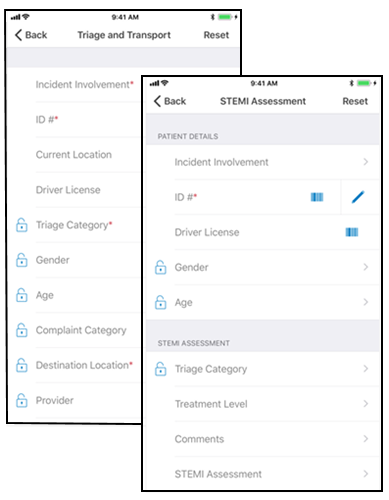
Patient intake forms are immediately visible. Forms designed for mobile devices make it easy to enter data and track patients by performing critical functions, such as scanning bar codes and triage tags, specifying demographic and triage information, and transporting, receiving, and discharging patients.
You can lock certain fields, such as location and mobile provider, that are common to an incident. The padlock icon appears next to fields that have this option. Data in locked fields cannot be overwritten and it is retained as you navigate between screens, scan bar codes, and log in and out again. If you unlock a field, it is cleared every time a bar code or triage tag is scanned.
Incoming Patient Notifications
IPNs are generated when emergency medical service (EMS) providers using EMTrack Web or Mobile submit patient forms with specific information, including the destination hospital and, optionally, estimated time of arrival (ETA). Forms submitted with this information automatically send IPNs, with patient assessment and critical alert information, to the destination hospital.
When the ETA is optional, the Implicit Arrival's Default ETA setting defaults to 45 minutes and is configured as a regional setting. If an ETA is entered, it will take precedence over the default ETA. For the Explicit Arrival setting, the Incoming Patient Notification (IPN) is sent, but will not list a time.
If no ETA is set, the IPN is sent automatically.
Numerous standard forms, such as the Sepsis Assessment, STEMI Assessment, Stroke Assessment, and Trauma Assessment forms for Web and Mobile, already contain the essential IPN fields and can be quickly activated for your region.
Remember, the following fields must be included and completed on forms to send IPNs.
-
Alert Type
-
Destination Location
Consider adding field components such as Vital Signs and Lab Results to include other valuable information on IPNs.
Daily Tracking
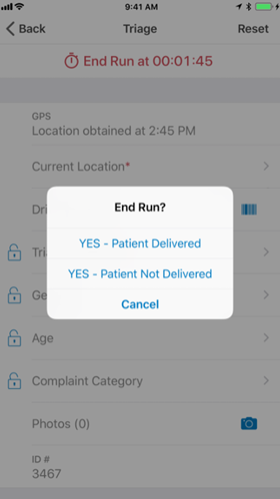
The run timer, located across the top of patient forms, supports daily patient tracking. Starting a run effectively tracks the time spent on a call and, when the patient identification number (ID#) has been entered, allows you to update the patient record during the run without re-entering the ID#.
The timer indicates run duration, which is ongoing until manually stopped according to your agency protocols. When ending a run, the patient is marked Delivered to indicate the run was successfully completed.
Configuration and Information Storage
EMTrack configuration information is stored on the device. Configuration settings that are stored include: triage categories, gender, complaint categories, current location, current incidents, mobile providers, mobile provider units, disposition, and estimated time of arrival (ETA). When connected, the EMTrack solution requests configuration updates from the app every 15 minutes.
Configuration controls how incidents are selected. If the Set Incident on Login setting is enabled, you are prompted to select the appropriate incident each time you log in. This setting improves data to incident association.
Timeout
If you are inactive for 30 minutes, the mobile app automatically times out and logs you out of EMTrack Mobile. To continue using the app, you need to log in again.
About EMTrack
EMTrack is a patient, people, pet, property, and equipment tracking solution used to manage emergency incidents and planned events at any scale. Using a common operating picture, EMTrack promotes cooperation among healthcare-related organizations by facilitating interoperable communication and situational awareness. Emergency management, healthcare clinics, and hospitals use EMTrack to track, coordinate, and manage the movement of people from an encounter at the scene through transportation to and discharge from a healthcare facility. EMTrack also supports family reunification efforts.