Send IPNs
Incoming Patient Notifications (IPNs) facilitate communication between emergency medical services (EMS) and hospitals that use EMTrack or EMResource. As an EMS provider, IPNs allow you to send patient information, collected through EMTrack forms, to destination hospitals.
This information provides critical patient details to help hospitals better prepare for patients before they arrive. Hospitals can respond to notifications, according to regional protocols, by acknowledging, diverting, and/or receiving patients. This gives you quick confirmation or insight regarding necessary redirects.
IPNs further open communication between EMS and hospitals with secure, bi-directional messaging that allows destination hospitals to request updates, or provide care and delivery instructions.
 Patient Forms
IPNs are generated when EMS teams using EMTrack Web or Mobile submit patient forms with specific information, including the destination hospital and, optionally, estimated time of arrival (ETA). Forms submitted with this information automatically send IPNs with the patient assessment and critical alert information to the destination hospital.
Daily Tracking
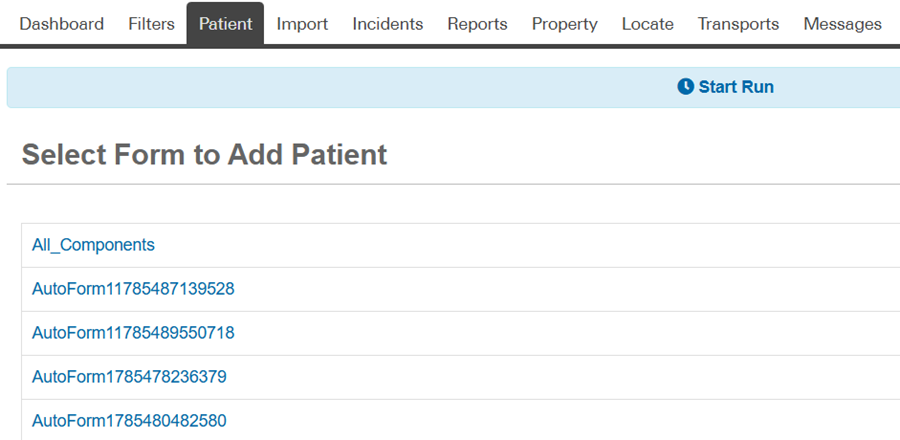
The run timer, located across the top of patient forms, supports daily patient tracking. Starting a run effectively tracks the time spent on a call and, when the patient identification number (ID#) has been entered, allows you to update the patient record during the run without re-entering the ID#.
The timer indicates run duration, which is ongoing until manually stopped according to your agency protocols. When ending a run, the patient is marked delivered to indicate the run was successfully completed.
To generate and send IPNs
-
From any page, click the Patient tab. The Patient page opens.
-
Optionally, click Start Run.
-
Click an appropriate form.
-
Enter the patient information, including all required fields such as the ID# and Destination Location. Enter optional information you want to include, such as the ETA.
Some form fields have dependencies. For example, if you enter the AVPU level, you must also enter the Date and Time Measured.
-
Click Save. The IPN is automatically sent to the destination hospital. Subsequent communication with the hospital can be viewed or responded to on the Messages tab.
To receive and send IPN messages
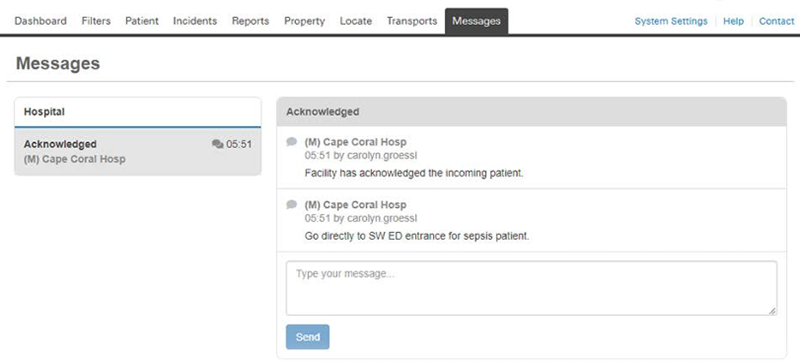
Messages related to IPNs are received and can be responded to from the Messages tab. When new messages are received, a number appears to the right of the tab indicating the total number of unread messages.

-
From any page, click the Messages tab. The Messages page opens. Actions appear on the left and messages appear on the right in chronological order.
-
To respond, on the lower right, enter your message and click Send.
To update patient information
-
From any page, click the Patient tab. The Patient page opens.
-
Click the appropriate form.
-
Enter the patient ID#.
If you are using daily patient tracking and are currently still involved with an active run, the ID# is automatically populated and cannot be changed until you end the run.
-
Enter new or updated information in the form fields.
-
Click Save. Updates are sent to the hospital.
To end the daily tracking run
If the Start Run option was selected, EMS can end the active patient encounter by selecting End Run. This also changes the patient’s current location to the destination facility.