Dashboards
This visualization tool enables you to arrange a combination of boards or maps into a unified dashboard. Dashboards are a fast and simple way for administrators to organize critical information in a meaningful format and make it available to users in one place. You can create unique dashboards specific to your agency, your preferences, or the incident. You can also edit or delete dashboards as circumstances and incident demands change.
When creating a dashboard, administrators have multiple options. They can specify the number of boards or maps to include in the dashboard, choose from a variety of layouts, and set filters to control how the information is displayed on each board. Access permissions to all dashboards are managed through Unified Command Platform feature groups, allowing administrators to make dashboards visible only to the users who need them.
The dashboards you create are available in the User View on the Dashboards page. See Create a Dashboard for details.
Additionally, users can create their own dashboard and customize it to fit their workflow. Administrators preselect the boards and maps that become available when users build their dashboard. See Create a User Dashboard View for details.
For more details about this plug-in, watch the Dashboard Training Video  .
.
Your Juvare product login does not grant access to the Juvare Training Center. To view the training video, please create a separate account on the Juvare Training Center site.
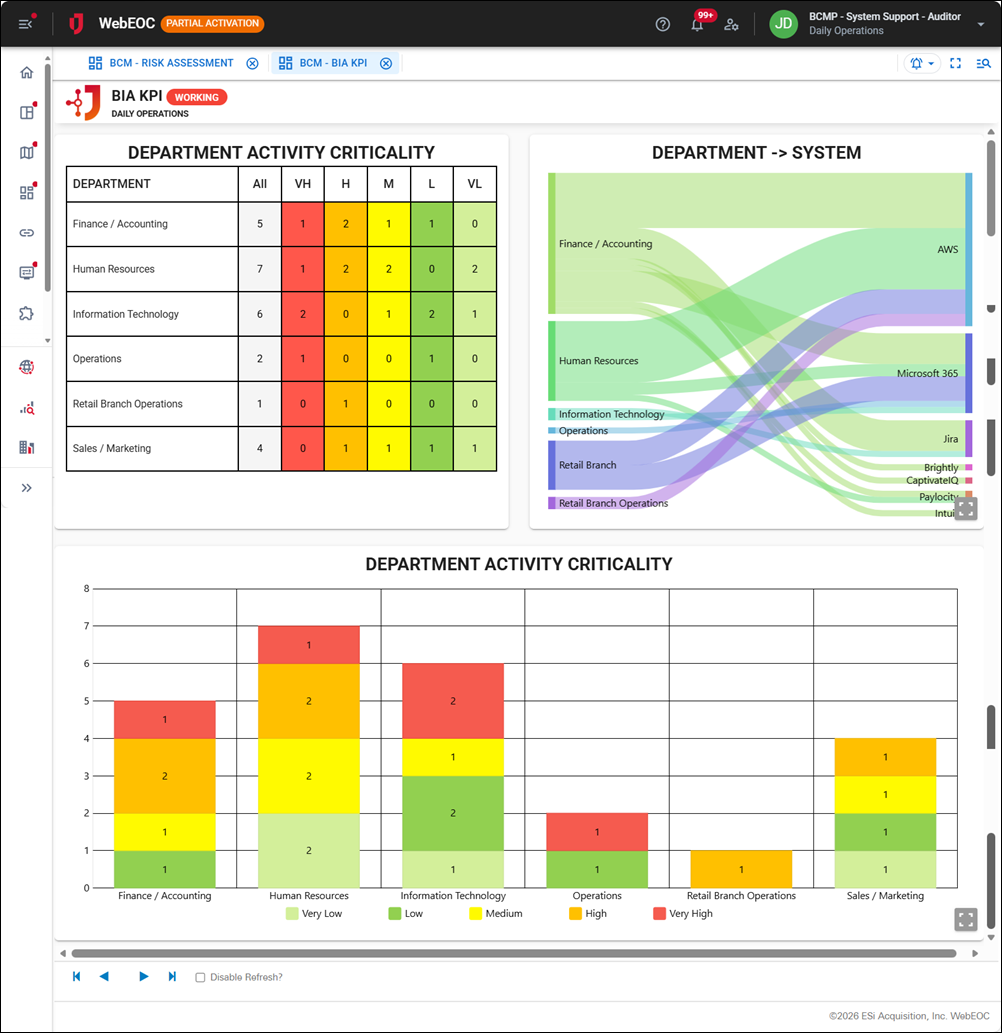
Here is an example of a dashboard.
Related Concepts
Related Tasks