Remove the XSLT Warning from Board Views
Google is removing XSLT support from Chrome starting with version 158, scheduled for release in mid-November, 2026.
What this means for you
Nothing is broken today. Unified Command Platform continues to work as expected.
When the version after 158, Chrome 159, is released in early December, users may see a browser warning that states: “This site uses XSLT, a functionality that is being removed from this browser very soon.”
This warning may display when:
-
A user opens certain board views in the User View.
-
An Admin opens the Design View tab in the Board Editor.
This is a notice from the browser, not an error in Unified Command Platform.
Why you might see the warning on a board
In some cases, the warning text is saved into a board view when an administrator edits and saves that view. If that happens, every user who opens that view will see the warning.
To Remove the Warning
Juvare is actively working on a solution for this issue. Until it is resolved, you can remove the warning manually.
To remove the warning from a view
-
In the main menu, click the workflows icon
 . The Workflows page opens.
 -
On the Boards tab, click the name of the appropriate board.
-
On the Board: Edit Board page, go to the Edit section and click Board Editor.
-
On the Board Editor: [Board Name] page, click the name of the view that is displaying the error.
-
Open the Advanced Code Editor.
-
Remove this warning code from the view:
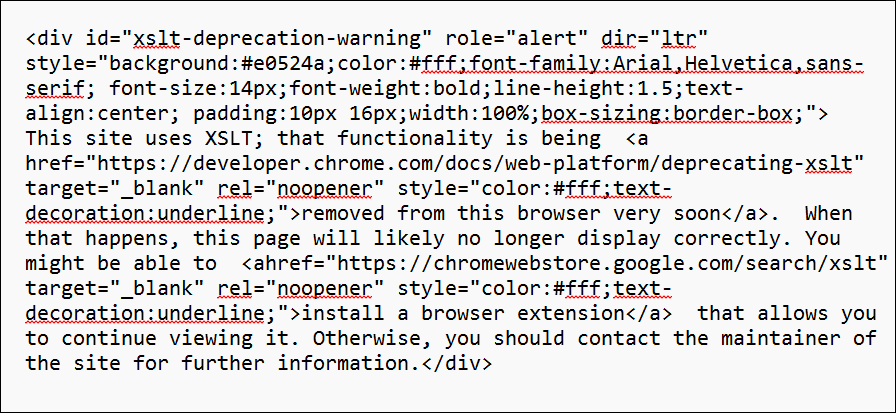
-
Save the view.
The warning will no longer display for users of that view.