View and Manage Network Invitations
On the JX Networks page, you can review your network invite history and manage invitations by accepting or declining them. If you decline an invitation, you still have the option to accept it later.
To view and manage network invitations
-
In the main menu, click JX Networks. The Networks page opens.
-
In the upper-left side of the page, click Invitations.
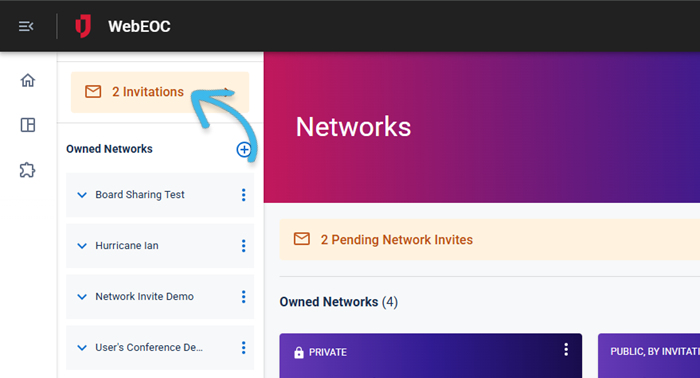
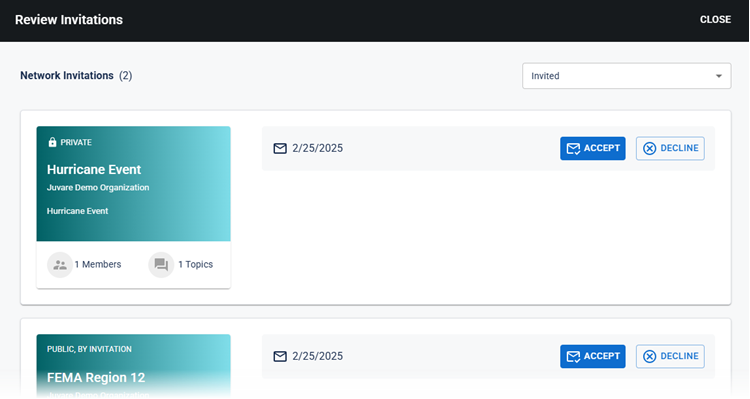
The Review Invitations window opens. The pending network invitations (if any) are displayed.
-
Do any of the following:
-
To accept or decline an invitation, select Accept or Decline.
-
To view declined invitations, click the drop-down menu at on the upper-right side of the window and select Declined. The Declined Invitations page opens. To accept a declined invitation, click Accept. To return to the Network Invitations page, from the drop-down menu, select Invited.
-