<chart>
The <chart> tag displays numerical data in chart/graph form; rendered as <img>.
| Attribute | Allowed Values | Requirements | Description |
|---|---|---|---|
| backgroundcolor | (COLOR)#ffffff | Implied | Background color of the chart. Any HTML color can be used; the default is white. |
| font | The font of the text in the legend or labels. | ||
| filter | CDATA | Optional | SQL conditional statement; only applied when outside of <eocrepeatallrecords>. The expression is a stored procedure. |
| groupby | SQL | Optional(type=bar|pie) | Collates by the indicated field; only applied when outside of <eocrepeatallrecords>. The values of the field become the x-axis labels on the chart. |
| groupby | SQL | Required(type=line) | All the comments for the optional implementation apply; additionally, this represents the x-axis for type=line. |
| height | NUMBER | Optional | Height of the chart in pixels in points. |
| hidelabels | (false|true)false | Implied | Whether to hide the value labels when legend is false. |
| is3d | (true|false)false | Implied | Specifies if the chart image should be in 3D or 2D format. |
| labels | Specifies whether values are labeled when not using a legend. The default is true. | ||
| legend | (false|true)false | Implied | Specifies whether a legend will be displayed. The default is false (not displayed). |
| legendcolor | COLOR | Optional | Color of the text in the legend. |
| legendfontfamily | FONTFAMILY | Optional | Font family of the text in the legend. |
| legendfontsize | NUMBER | Optional | Font size of the text in the legend. |
| legendreplacement | (bottom|middle|top)middle | Implied | Specifies where the legend will be displayed. The default is to show legends on the right side of the chart. |
| title | CDATA | Optional | Title to be displayed at the top of the chart. |
| titlefontfamily | FONTFAMILY | Optional | Font family of the text in the title. |
| titlefontsize | NUMBER | Optional | Font size, in points, of the text in the title. |
| type | (bar|line|pie) | Required | Controls the type of chart displayed. Supported types include pie, line, and bar. |
| width | NUMBER | Optional | Width of the chart in pixels. |
Bar Chart Example
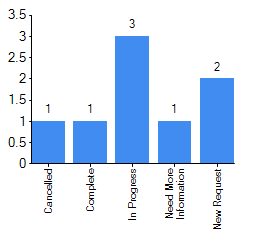
The following code uses the <groupby> attribute to produce a bar chart that shows the number of tasks within a Mission/Task board for each status.
<chart type="bar" groupby="status" legend="true"labels="false">
<dataexpression>count(*)</dataexpression>
</chart>
Line Chart Example
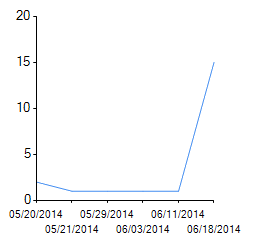
The following example code displays a line graph to show the number of position log entries over a period of time.
<chart type="line" groupby="convert(varchar,orginating_datetime,101)">
<dataexpression label="Entry Times">count(*)</dataexpression>
</chart>
Pie Chart Example
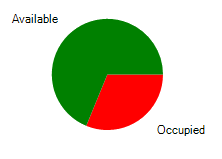
The following code example results in a pie chart showing overall shelter availability. Keep in mind that the chart is displayed outside of the <eocrepeatallrecords> tag.