JAI-Assisted Writing
JAI includes a writing assistance tool available within rich text editors in notifications and boards. You can highlight text and use JAI to rewrite, enhance, summarize, or simplify it, making your content clearer and easier to understand. You can also use JAI to format content, such as adding it to tables or restyling it. You can then review the suggested changes and apply them as needed, so you stay in control of the final content.
Examples of prompts include:
-
Make this more professional.
-
Simplify this wording.
-
Rewrite this for clarity.
-
Format the content as a table.
To use JAI writing assistance
-
In a rich text editor, enter the text you want help with, then select it and click the
 icon.
icon.You may have to select the more menu (
 ) on the editor to access the icon.
 -
In the JAI Edits dialog, enter a prompt.
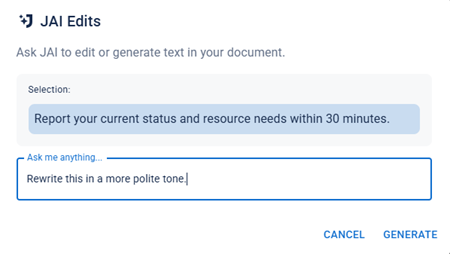
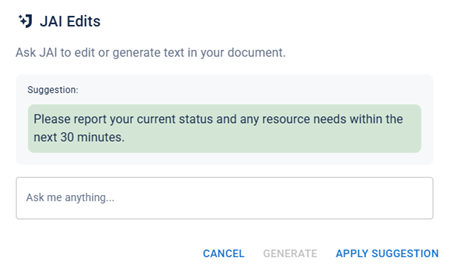
A suggestion is generated.
-
Do any of the following:
-
If you are satisfied with the suggested change and want it to replace the highlighted text, click Apply Suggestion.
-
If you want to refine the suggestion, enter another prompt into the Ask me anything field and click Generate. You can continue to refine the suggestion as needed.
-
To discard the suggestion and return to your message, click Cancel.
-