Settings Module
Settings should be reviewed after the initial implementation, and then annually. Once Crisis Track has been implemented, settings are typically static. Settings allow administrators to configure the account Used to track and manage users. Accounts differ from your profile, which is used to modify personal settings for using the solution.'s display, notification An alert, update, advisory, information, drill, or test message that can be sent & received through delivery methods such as email, voice, text, fax, or inbox., and security parameters, determine if notifications are sent (and to which individuals or groups Comprised of accounts with certain shared characteristics, such as role or location, but not necesarily employer.), and set security options. It also allows administrators to specify at what threshold Crisis Track enters the High Data Mode for handling a large number of entries.
To access the Settings module
-
Log in to the Crisis Track Console.
-
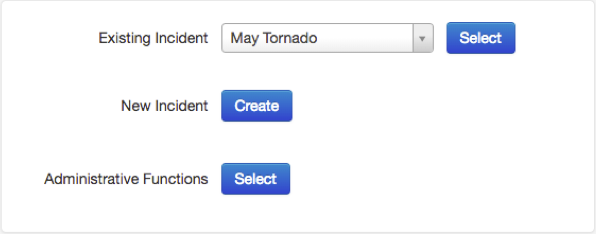
On the Crisis Track homepage, next to Administrative Functions, click Select.
-
Click the Settings icon.
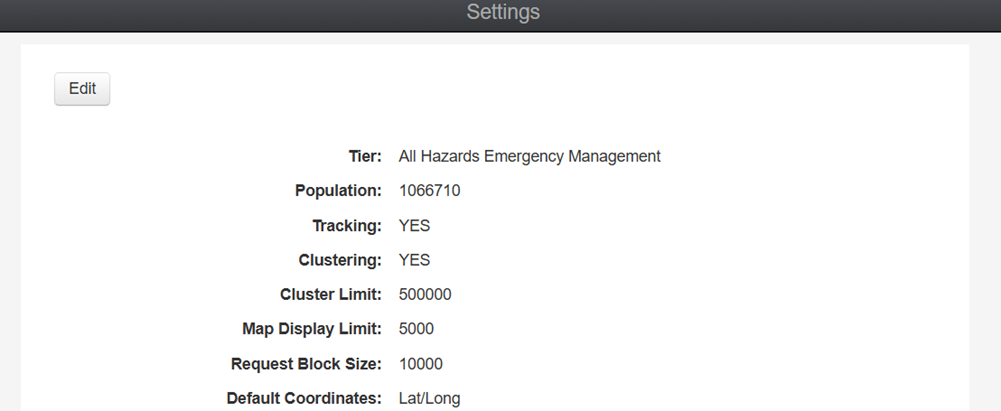
From here, you can see a list of settings.