Charts are an excellent way to express complex data in a simple format. DesignStudio Pro provides you with the tools to create the following charts that can help visualize data on a dashboard.
While different chart types render differently, in DesignStudio Pro, they share characteristics that are available in their settings. One example is the ability to render a legend or label at the bottom of each chart.
In the settings window, legends are managed through the Chart Legend Type field. You can specify if you want the graph to render with a Legend or Label below the graphic, or you can choose the default action (None) to render the graph without a label or legend.
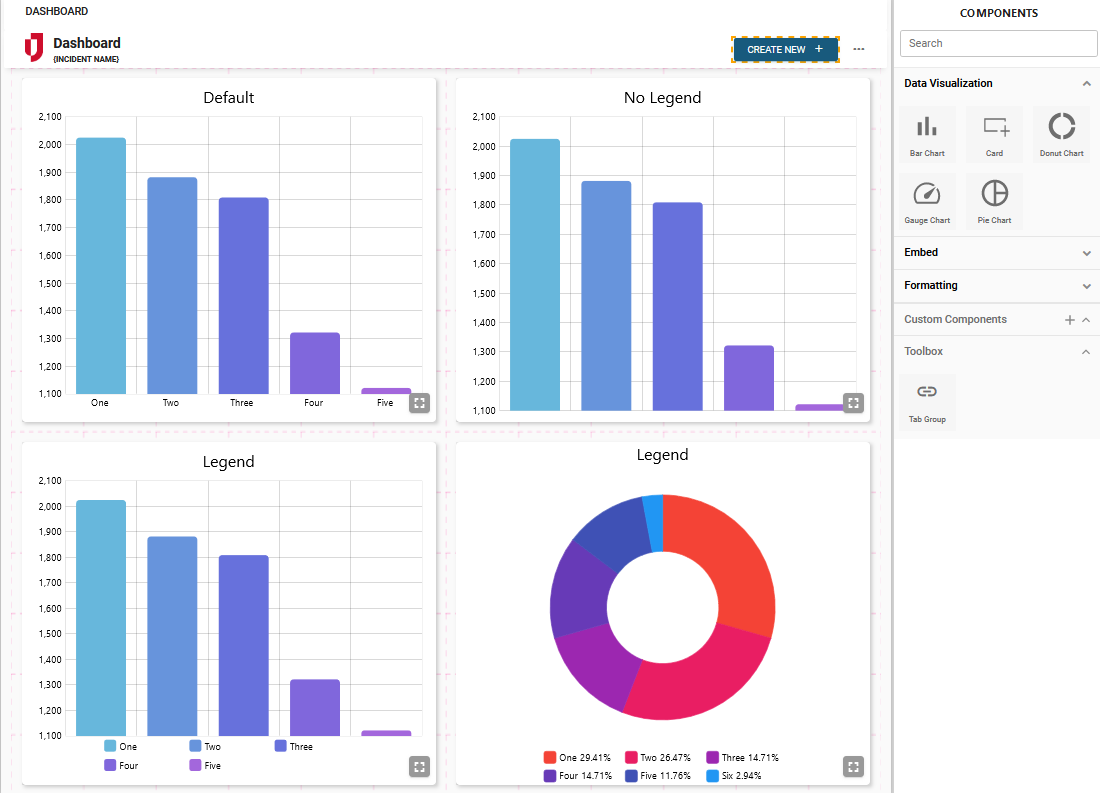
Example of Four Charts With and Without Legends
In the following example, four graphs are displayed.
-
The upper left bar chart displays a chart for which Label was chosen. The unit numbers appear below the chart.
-
The chart that appears to the right displays a chart for which None was chosen. Nothing appears below the chart.
-
The two charts on the bottom display a bar chart and a donut chart for which Legend was chosen. Legend information appears below the charts.