Add a Share Button to List, Details, and Dashboard Views Classic Styling
You can add a Share button Component that displays a button giving users access to Share Links for generating direct URLs. to your board on the List, Details, and Dashboard views. When a user clicks this button, users can quickly generate and share direct URLs to WebEOC Nexus board views.
See Share Board Links in the WebEOC Nexus Admin Help Center for a description of this feature, which is available in WebEOC Nexus 10.18 and later.
This is supported in the List, Details, and Dashboard views.
To add a Share button to a Details, List, or Dashboard view
-
Click the gear icon on the App Bar.

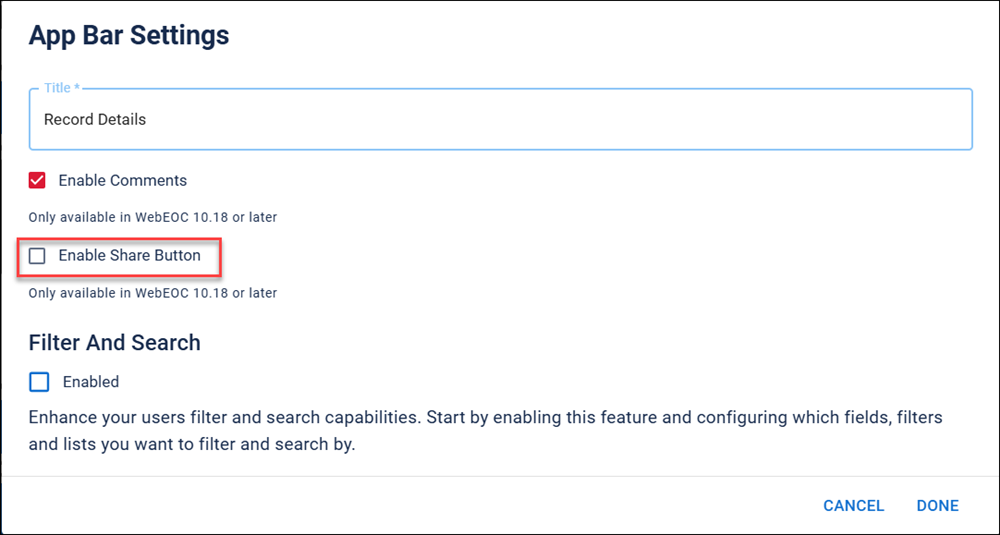
The App Bar Settings dialog opens.
-
Click the Enable Share Button checkbox.
-
Click Done.
The Share button displays in the App Bar.
Add Share buttons in other views and versions
In the Nexus Component Styling version, you can:
-
Add a Share button to Details views using the App Bar.
-
Add a Share button to List views using the List View Settings component.
-
Add a Share button to Input and Details views using the Share Button component.