Address Component Classic Styling
Address Component Nexus Component Styling

The Address component inserts an Address field on the canvas.

The Address component is supported in the Input view and is found in the Formatting section of the Components tray.
Settings
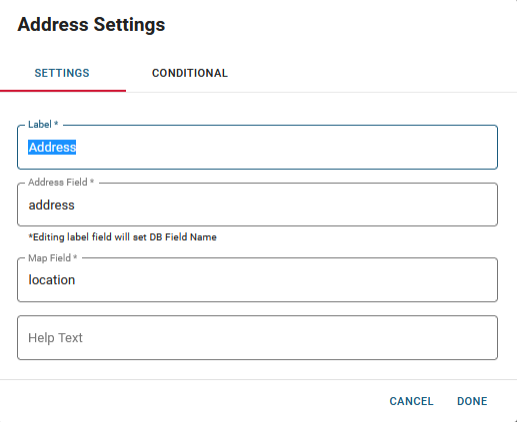
The following settings are available.
|
Field |
Description |
Procedure |
|---|---|---|
|
Label |
A unique identifier that briefly describes the component in the user interface. |
Enter between 2 - 50 alphanumeric characters, excluding special characters. |
|
Address Field |
A unique identifier that briefly describes the component in the database table. The text in this field becomes the database field name. |
Enter between 2 - 50 alphanumeric characters, excluding special characters. |
|
Map Field |
A unique identifier for map data to be populated in if using a geolocated coordinate for the address. The text in this field becomes the database field name. |
Enter between 2 - 50 alphanumeric characters, excluding special characters. |
|
Help Text |
The tooltip that appears when the pointer is over the field. |
Enter between 2 - 50 alphanumeric characters, excluding special characters. |
|
Conditional Settings |
The component only appears when certain conditions in relation to another component are met. |
Actions Toolbar
The following actions are available when you select any component on the canvas in the Board Workspace when working with Classic Styling.
| Icon | Name | Description | Procedure |
|---|---|---|---|

|
Settings |
Opens the Settings dialog. You can modify the component’s settings, such as label, database field name, help text, style, and conditional settings. |
|

|
Move |
|
This icon is not used. To move the component, click and drag it to its new location. |

|
Clone |
Copies the current component and its settings, then pastes it after the current component. |
|

|
Delete |
Deletes the selected component. |
|
Related Concepts