
The Auto Number component adds an automatic numbering system that increments each time a record is created.
The Auto Number component is supported in the Input view and is found in the Advanced section of the Components tray.
On the canvas, the auto number appears as a random number that displays as an example of how the field will look.

See Add Board Components for details about adding components to a view.
Settings
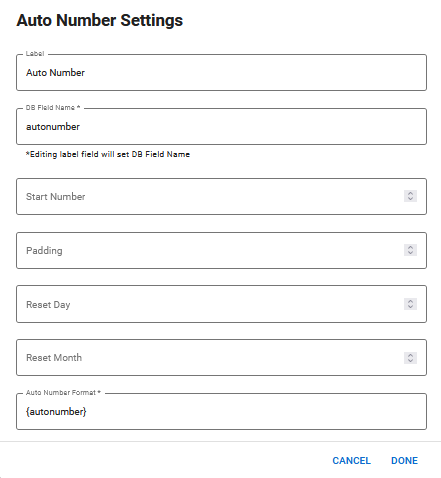
The following settings are available.
| Field | Description | Procedure |
|---|---|---|
|
Label |
A unique identifier that briefly describes the component in the user interface. |
Enter a name. |
|
DB Field Name |
A unique identifier that briefly describes the component in the database table. The text in this field becomes the database field name. |
Enter a name. |
|
Start Number |
The first number before incrementation takes place. The default number is 1. |
Enter a number. |
|
Padding |
The numbers that are skipped when an incrementation takes place. For example, if you enter 1 and the starting number is 1, the numbers increment in this order: 1, 3, 5, 7, and so on. |
Enter a number. |
| Reset Day |
The day of the month when the counter resets. If you do not specify a number, the counter resets on the first of each month. |
Enter a number in a two-digit format. For example, 01 or 15. |
|
Reset Month |
The month in which the counter resets. If this field is used without the Reset Day field, the counter resets on the first day of the specified month. |
Enter a number in a two-digit format. For example, 01 or 11. |
|
Auto Number Format |
A custom format that is used for the auto number. For more information see <autonumber> in the WebEOC Nexus Admin Help Center. |
Enter <autonumber> tag information. |
Actions Toolbar
The following actions are available when you select any component on the canvas in the Board Workspace when working with Classic Styling.
| Icon | Name | Description | Procedure |
|---|---|---|---|

|
Settings |
Opens the Settings dialog. You can modify the component’s settings, such as label, database field name, help text, style, and conditional settings. |
|

|
Move |
|
This icon is not used. To move the component, click and drag it to its new location. |

|
Clone |
Copies the current component and its settings, then pastes it after the current component. |
|

|
Delete |
Deletes the selected component. |
|