Get Started
DesignStudio is a board building ecosystem that provides all the tools that you need for building boards for WebEOC. In DesignStudio, boards are created, designed, edited, and published for displaying and capturing information in WebEOC. In WebEOC, boards are used to manage and share information with authorized groups and individuals in your system and between linked systems. For example, a board created in DesignStudio is published to WebEOC to collect and display incident information.
Some features are only available in DesignStudio Pro. Pro features appear in the user interface with a  designation.
DesignStudio Pro provides you with additional tools to create forms. Forms help agencies and organizations collect information from the public, community partners, and internal stakeholders. They feed directly into WebEOC boards.
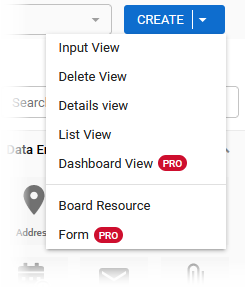
If you have DesignStudio Pro, the features are active and you can click them; otherwise, they are dimmed and unavailable. Contact your Client Success Manager (CSM) for information about upgrading to DesignStudio Pro.
 DesignStudio Requirements
-
DesignStudio Pro is required to use forms or dashboards
Activation and Logging In
-
Account Activation & Logging In using Juvare Login Services
- DesignStudio Account Management in DesignStudio
Key Concepts
DesignStudio Key Concepts provides a brief description of important concepts and links to find out more.
How Do I. . .?
How Do I . . . ? links to commonly referenced topics in the DesignStudio Help Center.