You may be asked to participate in a test of your organization Official entities, such as public health authorities, healthcare agencies, and corporations.'s eICS notification An alert, update, advisory, information, drill, or test message that can be sent & received through delivery methods such as email, voice, text, fax, or inbox. system. You may receive notifications via telephone and/or email. As a participant, it is your responsibility to confirm receipt of each type of notification. Confirmation is accomplished via phone and by clicking the link in the email so that you can use eICS to confirm receipt.
Note: Test messages can be sent by phone, text, and/or email.
To confirm receipt of a voice notification
When a voice notification comes in, listen to the instructions and press the appropriate numeric key when instructed to do so.
If you miss the call, listen to the voicemail message and note the phone number and identification number. Call the number to retrieve your message.
To confirm receipt of an email notification
When the email message comes through:
-
Click the link in the email. The Verify Identity window opens.
-
Enter the phone number that you listed as Notify First in the notification preferences of your eICS profile
A collection of information that identifies and defines you in the solution. Your profile differs from your account, which is how you log in.. -
Click Submit. Either the Test Verification or Test Incident Administration page opens depending on your user role.
-
Take one of these actions if you:
Received notifications
-
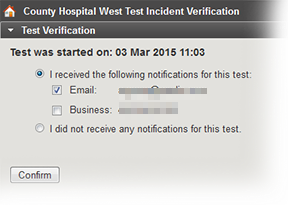
Click the appropriate response to indicate which notifications you received.
-
Click Confirm. The page refreshes.
-
As appropriate, click Return to Home Screen or log out.
Did not receive notifications
-
Select the I did not receive any notifications for this test option.
-
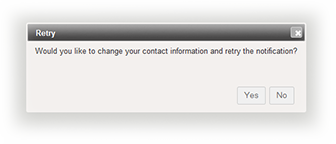
Click Confirm. The Retry window opens.
-
As appropriate, click Yes or No to check your contact information.
-
If necessary, change your contact information and save your changes. Alternatively, click Return to Home Screen.
-
Related Concepts