Other Regions
If you want to share resource information with another region, you need to establish a mutual aid agreement. To do this, the regions involved need to create and sign a written agreement, and then share it with Juvare. For more information about establishing a mutual aid agreement, please contact your Client Success Manager (CSM). After the agreement has been established in EMResource, you can manage visibility into your region by activating or deactivating the relationship with another region. You are also able to indicate which people in your region have access to view other regions by assigning read-only access to users and resources in your region.
When accessing another region, you see their default view with information about their resources. Just like when changing views within your own region, your events bar does not change between views and the information in the view refreshes every three minutes.
 View and Setup Other Regions
If you have access to view other regions, the Other Regions option appears in the main menu. In the submenu, select a region to open its default view. The information you see in another region’s view is read only, but you can click resource names to access the Detail View. Likewise, resource information on your default view is available to people from other regions that have the appropriate permissions.
As an administrator, you can manage your relationship with other regions through the main menu, by clicking Setup and then Other Regions. The Other Region List opens. This list identifies all regions with which you have mutual aid agreements, indicates the status of those relationships, and allows you to assign view rights.
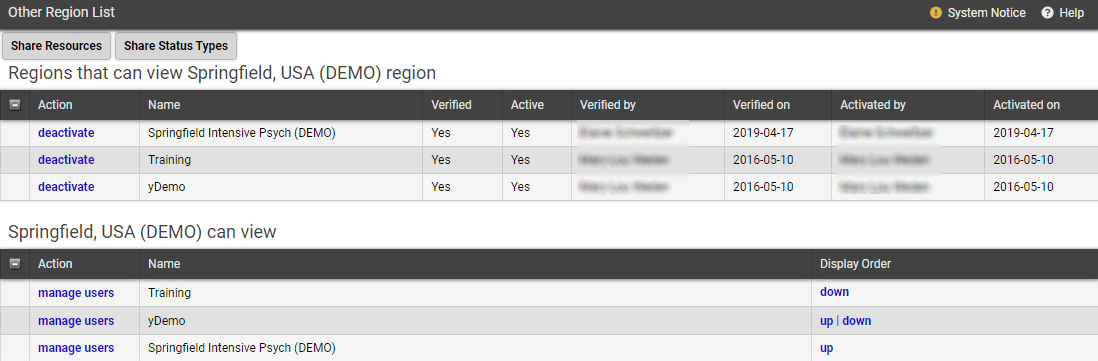
Regions that can view (region name) region
On the Other Region List page, the top table lists the other regions that have been granted view rights to your region and identifies if that access is active. Activated regions are allowed to view the resources and statuses that you have designated for sharing. As an administrator, you can manage the other region’s ability to view your information by activating or deactivating the relationship.
|
Action |
Description |
|---|---|
|
activate |
After a region has been verified, you can enable their ability to view your region by activating the relationship. |
|
deactivate |
Disable the other region's ability to view your region. |
The list also identifies who changed the verified and activated statuses and when that occurred.
(Region name) can view
On the Other Region List page, the second table lists the regions that you and other people in your region can view if the other region has activated the relationship. In this table, you can assign users in your region who can view the other regions and change the display order of regions in the Other Regions menu.
Related Tasks
On this page, you can also determine which resources and status types Custom fields that track information about resources. This is region-specific and are unique fields. are shared with other regions. For example, you can:
-
Share resources by selecting which resources in your region are visible to other regions with a mutual aid agreement. You can also manage the sharing of individual resource on the resource’s detail page (for more information on this, go to Resources).
-
Share status types by selecting the status types in your region that are visible to other regions with a mutual aid agreement. You can also manage the sharing of status types on the status type's detail page (for more information on this, go to Status Type Visibility).