Event Detail Report
The Event Detail report Provides specific information about statuses and details, notifications, forms, templates, snapshots, and roles/rights in EMResource. displays all information associated with an indicated event. For multi-region events, the Event Detail report includes all participating regions and resources.
To generate an Event Detail report
-
In the main menu, click Report, then click Event Detail. The Event Detail Report page opens.
-
In Start Date and End Date, enter the date range for the report.
-
Specify whether you want to include the resource list by clicking the checkbox.
-
For Event Templates, select the checkboxes for the templates you want to include in the report.
-
Click Next. The second page opens.
-
In the Select Events section, select the checkbox for each event you want to include.
-
Click Next. The third page opens.
-
If appropriate, select the checkboxes for the resources you want to include.
-
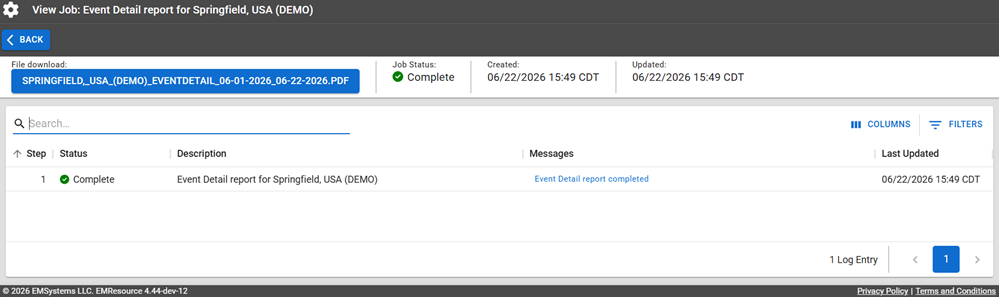
Click Generate Report to report the report PDF file. The Jobs page opens.
The report is available for seven days on the Jobs List.
-
Click the report name in the blue box to download it.
Report Fields
The report will generate the following fields in the output file.
| Report Field | Description |
|---|---|
| Event Box | |
| Event Title | The name of the event. |
| Started By | Who created/started the event. |
| Event Information | Information related to the event. |
| Start Time | The start date and time of the event. |
| End Time | The end date and time of the event. |
| Drill | Whether the event is a drill (Y) or not (N). |
| IP | The IP address associated with the event. |
| Update | The number of updates the event had. |
| Updated By | The username of the user who last updated the event. |
| Updated Time | The date and time of the last update. |
| Regions and Resources Involved | |
| Regions Involved | The name of all regions involved in the event. |
| Resources Involved | The names of all resources involved in the event. |
| Resource | |
| Status Type | The name of the resource status type. |
| Updated | Whether any update was provided for the resource. |
| User | The name of the user who made the update, if applicable. |
| Status | The status change that was made, if applicable. |