Status Summary Report
The Status Summary report Provides specific information about statuses and details, notifications, forms, templates, snapshots, and roles/rights in EMResource. displays the total amount of time reported for each status by selected facilities during the chosen time period.
To generate a Status Summary report
-
In the main menu, click Report, then click Status Summary. The Status Summary Report page opens.
-
In Start Date and End Date, enter the date range for the report.
-
For Report Format, select either:
-
Adobe Acrobat (PDF)
-
Excel Report (XLSX)
Be aware that for Excel, EMResource generates .xlsx files and does not support the older .xls format.
-
-
Click Next Step.
-
Select the checkboxes for the resources you want to include in your report or click the checkbox in the header row to select all resources.
-
Click Next Step.
-
Select one or more status types
Custom fields that track information about resources. This is region-specific and are unique fields.. -
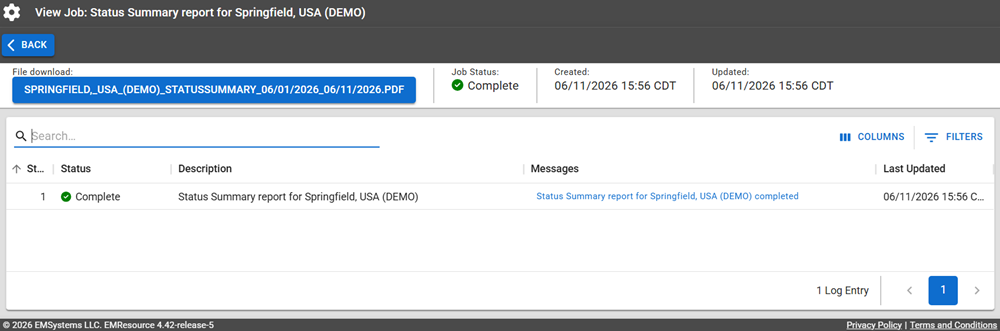
Click Generate Report. The Jobs page opens.
The report is available for seven days on the Jobs List.
-
Click the report name in the blue box to download it.
Report Fields
The report will generate the following fields in the output file.
| Report Field | Description |
|---|---|
| Status Summary | |
| Status Type | The name of the status type, for example, Hospital. |
| Resource | The name of the resource, for example Bravo Hospital. |
| Status | The value of the status; this could be status text (Fully Operational) or it could be a numeric value. |
| Total Hours | The total number of hours reported for this status type/status for the resource for the selected date range. |
| % of Total | What percentage of the total time for the date range that the total hours represents. |
| Aggregate by Resource Type | |
| Status Type | The name of the status type, for example, Staffing. |
| Resource Type | The name of the resource type, for example, Hospital. |
| Status | The name of the status; this could be status text (Fully Operational) or it could be a numeric value. |
| Total Hours | The total number of hours reported for this resource type/status type/status for the selected date range. |
| % of Total | What percentage of the total time for the date range that the total hours represents. |