Create or Edit a Sub-Resource Type
Depending on your role Assigned to determine which features and functions are available to users., you may be able to create and edit sub-resource types Categories used to divide and distinguish sub-resources. Sub-resource types belong to resource types.. Sub-Resource Types are groups of sub-resources Secondary resources that are considered attributes of resources. These are often objects, services, or functions that belong to resources. that share a common characteristic and report Provides specific information about statuses and details, notifications, forms, templates, snapshots, and roles/rights in EMResource. some kind of status.
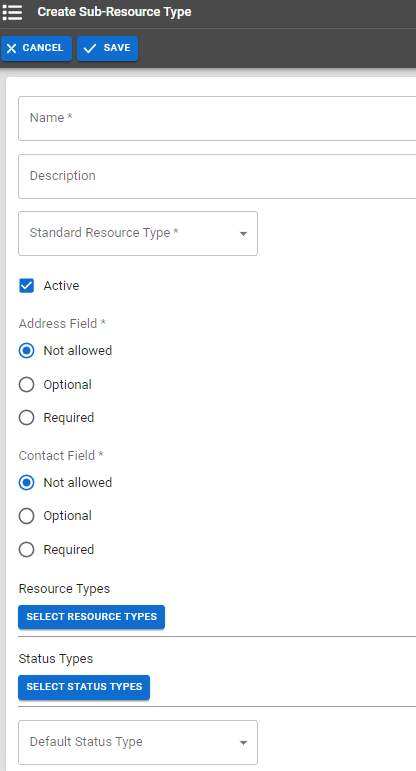
To create or edit a sub-resource type
-
In the main menu, click Setup then click Resource Types. The Resource Types page opens.
-
Take one of these actions:
Create a sub-resource type
Click Create Sub-Resource Type. The Create Sub-Resource Type page opens.
Edit a sub-resource type
-
Locate the sub-resource type and on that row, click (sub-resource type) name. The View Sub-Resource Type: (sub-resource type) page opens.
-
Click Edit. The Edit Sub-Resource Type: (sub-resource type) page opens.
-
-
Enter or edit this information.
Resource Type fields and actions Field
Description
Name
Label or title of this sub-resource type.
Description Information that describes the sub-resource type. Standard Resource Type
Identifies the icon and category associated with this sub-resource type.
Status
When selected, indicates the sub-resource is Active and available for use.
Address
Indicates the relevance of an address for this sub-resource type. Options include:
-
Required
-
Optional
-
Not Allowed
Contact
Indicates the relevance of contact information for this sub-resource type. Options include:
-
Required
-
Optional
-
Not Allowed
Resource Types
Identifies the resource types
Categories used to divide and distinguish resources. associated with this sub-resource type. Sub-resources that belong to this sub-resource type can only be created for resources belonging to one of the selected resource types.Status Types
Searchable list of status types
Custom fields that track information about resources. This is region-specific and are unique fields. that, when selected, indicate the type of status the resources with this resource type inherit and report.Default Status Types Default status type for this sub-resource. This is the status that appears by default on your custom and map views
A region's default map view, which shows the location of resources set by the regional administrator, and their resource status.. The default status type determines the color used when displaying associated resources on the map view.Example If ED Status is being selected as the default status type, the system uses the ED Status color set when displaying the icons representing these resources on the map (unless the user chooses a different status type in the map view).
-
-
Click Save.
Related Concepts