Deactivate a Resource Type
Authorized administrators can de-activate resource and sub-resource types Categories used to divide and distinguish sub-resources. Sub-resource types belong to resource types.. Once the status has been changed to inactive, all associated resources and sub-resources Secondary resources that are considered attributes of resources. These are often objects, services, or functions that belong to resources. are also de-activated. The type no longer appears in views. Though, all status type Custom fields that track information about resources. This is region-specific and are unique fields., resource, and sub-resource relationships are retained.
To de-activate a resource or sub-resource type
-
In the main menu, click Setup then click Resource Types. The Resource Types page opens.
-
Locate the resource or sub-resource type and on that row, click the (resource or sub-resource type) name. The View Resource or Sub-Resource Type: (resource or sub-resource type) page opens.
-
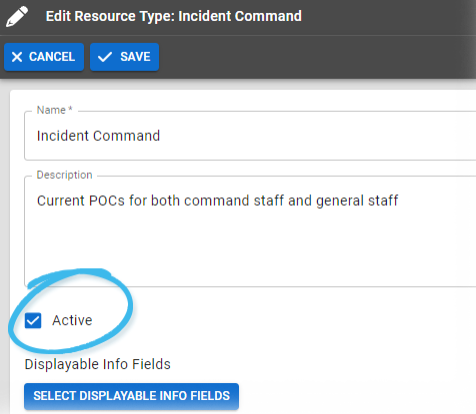
Click Edit. The Edit Resource or Sub-Resource Type: (resource or sub-resource type) page opens.
-
Just below Name and Description, clear the Active checkbox.
-
Click Save.
Related Concepts