Data Elements
A Regional Administrator can manage their region's data elements Fields and values as they appear in EMTrack Web and Mobile. (or fields and values) in EMTrack. Modifying these elements not only changes the values as they appear within EMTrack Web, but also the values that are available on EMTrack Mobile.
Managing an element includes specifying the values that appear in a particular field. It does not include adding or deleting data elements (fields).
The controls that appear in the data element configuration page depend on the type of field/data element you are viewing. On each configuration page, you may be able to add, edit, or delete values that appear in that field/element and change the order of values.
Configuration
Click System Settings, then on the left under Other Settings, click Data Elements. The Data Elements page opens.
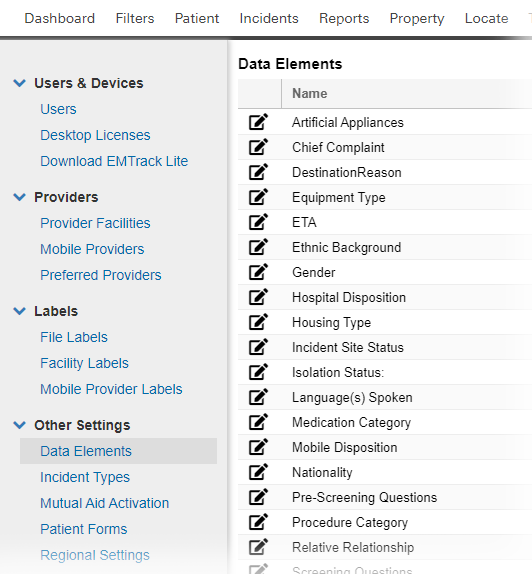
In many of these elements, you have an opportunity (or are required ) to assign a new value to a category. This aids in displaying the value in the appropriate place in the list of values. For example, if you add Trauma - limb to your Chief Complaint values, you will assign the Trauma category ( Assign To field). In this way, the new value will automatically appear with the trauma complaints. You can then use the arrows to change the value's location in the list.
Examples
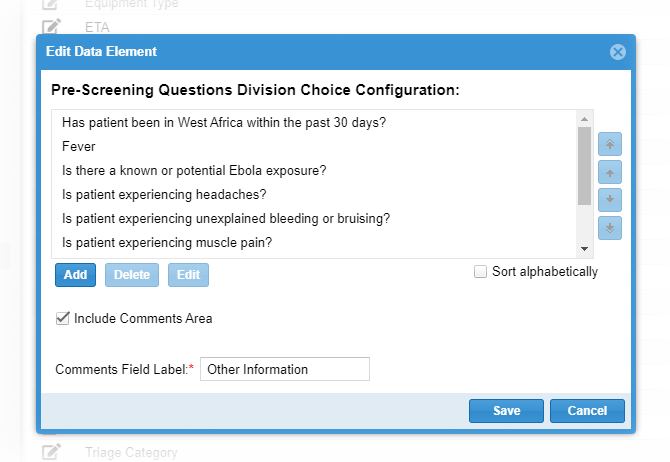
The administrator can specify that users must enter text in the ETA field or choose from values in a pick list. If you choose the latter, you can Add values to the list, edit an entry, or delete an entry.
You can specify the order in which the values appear to users. Select an option and use the arrows on the right to move the item up or down in the list. You can also select the Sort alphabetically option.