Mutual Aid Activation
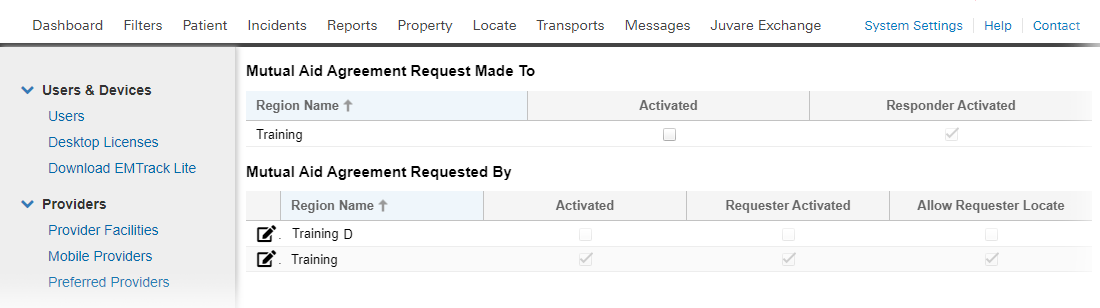
The Mutual Aid An agreement for aid between regions. When mutual aid is activated, patients can be transported and tracked between regions. Activation page allows Regional Administrators to manage their patient tracking relationships with other EMTrack regions. When mutual aid is activated, patients can be transported and tracked between regions.
To ensure data exchange between regions occurs only when necessary and appropriate, regional administration should activate a Mutual Aid relationship only when an incident occurs that requires exchanging information with that other region. It is equally important to deactivate these relationships once the incident is ended. Both actions are essential to preserving the integrity of the data gathered and exchanged throughout the incident.
You may decide to perform setup tasks before a multi-region incident occurs in order to be better prepared. This can help reduce the work you need to do at the time an incident occurs.
Click System Settings, then on the left under Other Settings, click Mutual Aid Activation. The Mutual Aid Agreement page opens.
Options
Sections and controls in the Mutual Aid Activation page are used as follows:
|
Section |
Control/Field |
Description |
|---|---|---|
|
Mutual Aid Agreement Request Made To |
checkboxes |
Shows regions to which you have submitted a request for a mutual aid partnership. Select the checkbox to activate mutual aid and clear it to deactivate. Your partner region must also activate the agreement on their EMTrack system. When they do, the Responder Activated checkbox is selected. |
|
Mutual Aid Agreement Requested By |
checkboxes |
Shows regions that have requested a mutual aid partnership with your region. If the Requester Activated checkbox is selected, the partner region has activated mutual aid. If the Allow Requester Locate checkbox is selected, the partner region can view and locate your region's patients during an incident. |
|
Edit icon |
Activated checkbox |
Select the checkbox to activate mutual aid and clear it to deactivate. |
|
|
Allow Requester Locate checkbox |
Select to allow users in partner regions to use the EMTrack Locate feature to view and locate your region's patients during an incident. |
|
|
Provider Facilities section |
Use this panes and controls in this section to set up the providers that your partner region will be able to view once mutual aid is activated. Only the facility providers you specify will be shared. |
In order to transport patients between regions, administrators for both regions must activate their mutual aid relationship.
Facility Provider
In preparation for another region's request to send patients to your region, choose which provider(s) (such as hospitals, shelters, points of debarkation, and so forth) they can specify as destinations within your region. Specifying a provider facility makes that facility and patients associated with it available to the requesting EMTrack region.
Preparation
You may decide to establish a single provider facility as your point of patient transfer for inter-regional transport.
For example, you can create a new Provider Facility as a "reception center" for patients from other regions. You may need to receive clients into your area, but you do not yet know their destinations. By creating this center, you give your mutual aid partners the ability to transport patients or clients to your region without specifying a particular hospital or shelter as a destination.
You can designate the facility provider for each of your mutual aid relationships at any time. Once done, the facility is available to your partner region the moment you activate the mutual aid agreement.
Provider Access
When a region needs to transport a patient to your region during an incident, that user specifies a destination in your region. If you specified a reception center for this mutual aid relationship, it appears in that region's Destination pick list.
Signed Agreement
To establish a mutual aid relationship with another EMTrack region, administrators in each region must sign an agreement (refer to the EMTrack Mutual Aid Form) and file it with Juvare. Juvare then creates the partner region and it appears in each region's EMTrack Mutual Aid Activation page. You can then activate mutual aid with that region.