These notes describe updates in the Unified Command Platform 10.24 release scheduled for October 16, 2026. More information is available in this help center or by contacting the Juvare Support Center at +1 (877) 771-0911 or support@juvare.com.
Google is removing XSLT support from Chrome starting with version 158, scheduled for release in mid-November, 2026. As of now, Unified Command Platform functions as expected. This updated release of Chrome may cause warnings to display for some board views. See Remove the XSLT Warning from Board Views for details.
Enhancements
Activate and deactivate an incident automatically
In previous versions, incidents required manual activation and deactivation, forcing someone to be available at the exact moment an operation begins or ends — a burden for planned events, exercises, and recurring operations. Now, admins can schedule an incident's start and end time in advance, and it activates and deactivates automatically at those times. Scheduled incidents can be activated or deactivated at any future date and time.
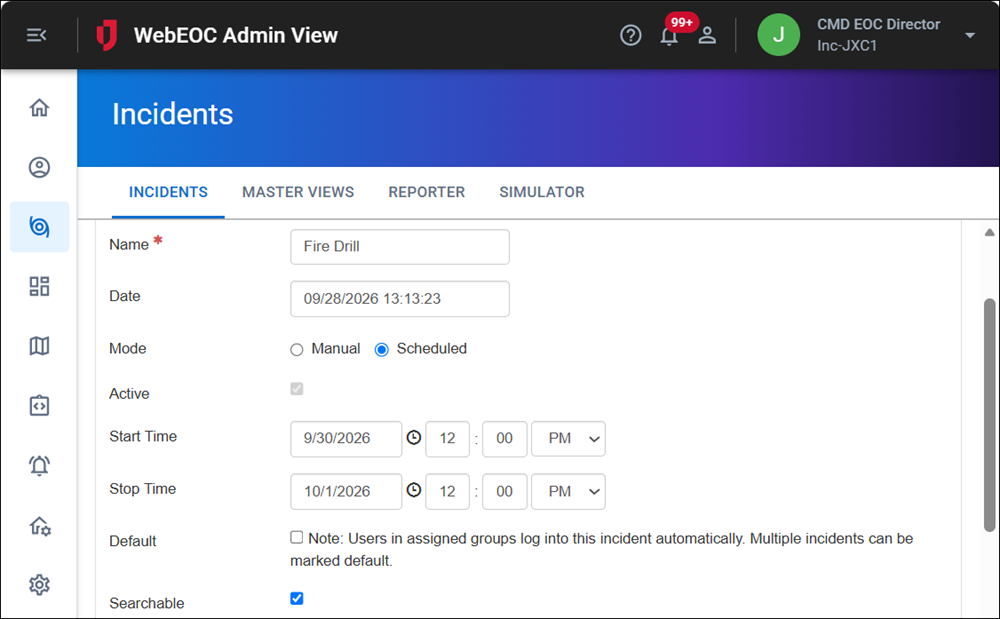
The scheduled incident appears on the Active Incidents page while active, and on the Inactive Incidents page before the start time and after the end time. The Active Incidents and Inactive Incidents pages display the start and end time for incidents.
See Create an Incident for details.
This feature was suggested through the Juvare Ideas Portal. We welcome your input to improve our products.
Set a default incident for a feature group
In previous versions, Admins could configure a single incident as the default. If a user was assigned to that incident, they did not need to select it from the Incident drop-down on the Position and Incident Selection page during login. To streamline the login process, Admins can now designate multiple default incidents. When an admin configures a feature group and adds a default incident to it, users assigned to that feature group’s positions are automatically logged into that incident. If a user belongs to multiple feature groups with default incidents assigned, they can select from these groups in the Incident drop-down on the Position and Incident Selection page during login. See Create an Incident for details.
This feature was suggested through the Juvare Ideas Portal. We welcome your input to improve our products.
Export Inactive Incidents
You can now export a list of all inactive incidents, past and future, from the Inactive Incidents page. See View Incident Reports for details.
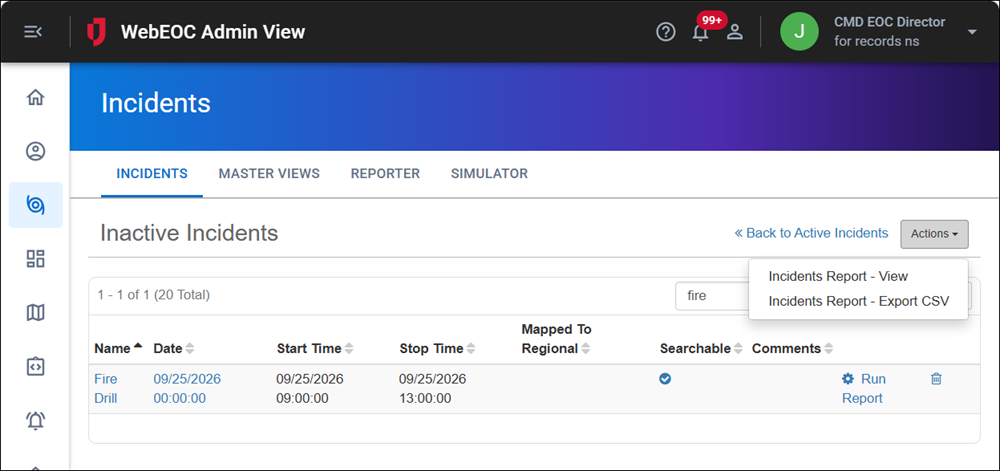
This feature was suggested through the Juvare Ideas Portal. We welcome your input to improve our products.
Resolutions
-
ArcGIS duplicate feature fix: Fixed an issue that caused duplicate features to be saved in ArcGIS when a sync was interrupted. These features did not display in WebEOC Nexus. With the fix, duplicate features are not saved if a sync is interrupted.
-
View refresh fix: Fixed an issue that prevented board data from refreshing for some users. When a board had two or more Display views on the same table, and user A’s view's applied filter used a username or positionname expression while user B’s view's applied filter had no identity expression, a change to data that satisfies User B’s view's filter didn’t generate a refresh notification for all users who have access to that sibling view. Now, refresh notifications are generated correctly in this scenario.
-
Navigation fix: Fixed an issue where a “404 page not found” error displayed if a user in the Admin view navigated to the Incidents page, then clicked the Master Views, Reporter, or Simulator tabs.
-
Multiple security and stability improvements.
Previous Versions
Release notes for previous versions are available here.