Landing Pages
The landing pages that you have access to appear in the main menu. When you select an option, the associated landing page opens on the right.
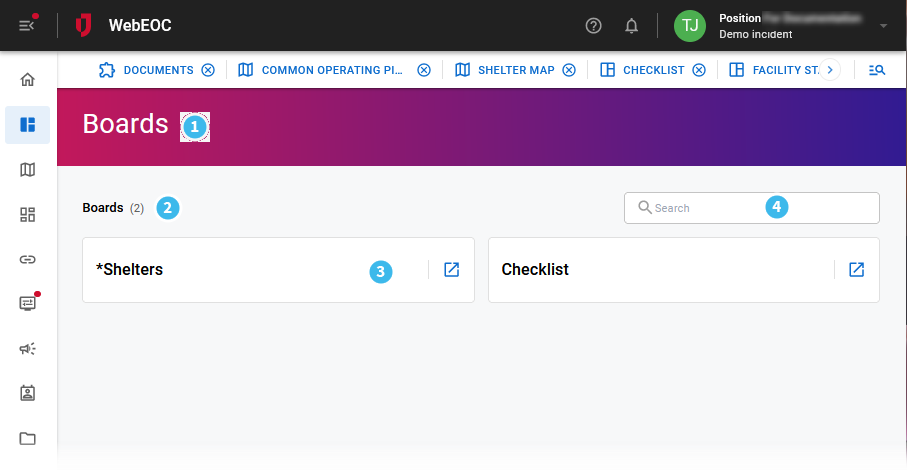
This section describes the UI elements that appear in the center of the landing page. To learn more about navigation and other elements that appear on your homepage, see Navigate the Unified Command Platform User View.
| Number | Description | Procedure |
|---|---|---|

|
The title of the landing page identifies which landing page you selected (for example, Boards or Plug-Ins). The background color is predefined and cannot be changed. |
|

|
The title of the landing page and the number of items that are available for this position. |
|

|
The tiles that contain the name of each item on the landing page (for example, on the Boards landing page, each tile contains the name of an available board). Tiles are listed in alphabetical order. |
To open a tile
|

|
A search field that only displays titles that contain the text you enter in the field. The number that appears after the title remains constant even when you use search to hide items. It refers to the number of items that are available—not the number of items that are currently displayed. |
Enter text in the field. |
 to the right of the tile name to open the corresponding in a new browser tab.
This table lists the landing pages that are available on the main menu in the User view. Your administrator grants access to these pages based on your position.
|
Landing Page |
Description |
|---|---|
|
Home |
The Homepage for the current position. See Navigate the Unified Command Platform User View for details. |
|
Boards |
The Boards landing page that lists all boards that the current position has permission to access. See Boards Management for details. |
|
Maps |
The Maps landing page that lists all maps that the current position has permission to access. See Mapping for details. |
| Links | The Links landing page that lists all links the current position has permission to access. |
|
Dashboards |
The Dashboards landing page that lists the dashboards and the custom dashboard that the current position has permission to access. Only one custom dashboard is allowed per position. |
|
Menus |
The Menus landing page that lists all menus that the current position has permission to access. See Menus for details. |
|
Plug Ins |
The Plug-ins landing page that lists all plug-ins that the current position has permission to access. See Standard Plug-Ins for commonly installed plug-ins. |
|
Alerts |
The Notifications landing page that allows you to send and manage alerts. See Alerts for details. |
|
Contacts |
The Contacts landing page that allows you to manage the contact accounts used with alerts. See Configure Alerts with Contacts for details. |
|
Documents |
The File Library landing page that allows you to store and share files and folders. See Documents for details. |