Manage Helper Tables
Helper tables refer to three supplementary datasets: Positions, Users, and Incidents. These tables are stored separately from the main board data and give JAI important context about WebEOC Nexus users, their positions, and the incidents they are working in, allowing it to provide more useful and relevant answers.
Example If a user asks JAI, “How many resource requests are assigned to my position in the incident I’m logged into?”, JAI refers to the helper tables to identify the user’s specific position and the active incident, then retrieves the matching data.
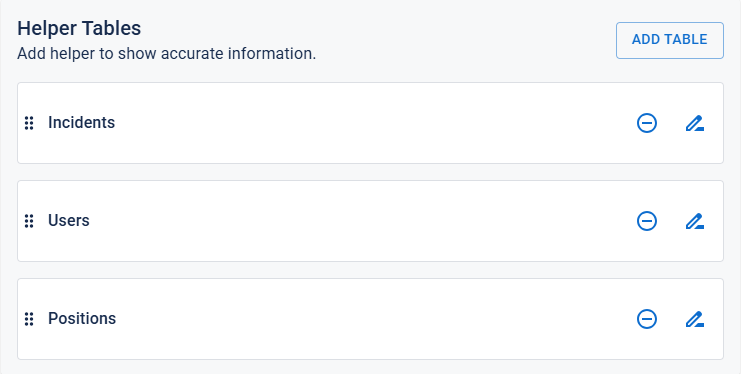
On the Helper Tables tab of the Set Configuration page, you can remove tables and later add them back if needed. However, we recommend keeping all tables in place and retaining the default settings. Although the interface appears to allow you to re-sort tables and edit their names, these options are disabled and any changes will have no effect. You can, however, edit the table labels and descriptions.
To manage helper tables
-
Click the Sources tab (if it is not already open). The list of boards currently being used as data sources is displayed.
-
Find the source that you want to modify and click its settings icon
 on the right.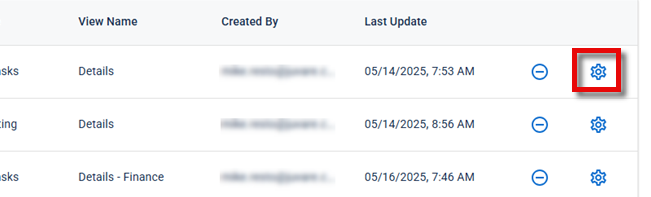
The Set Configuration page opens.
-
Click the Helper Tables tab. The current helper table configuration is displayed.
-
Do any of the following:
-
To remove a table, click its
 icon.
icon. -
To add a table:
-
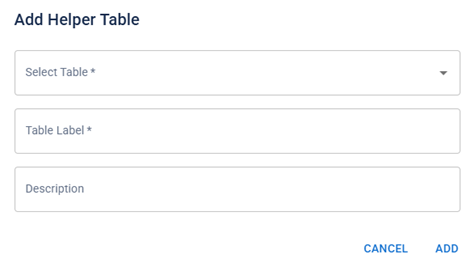
Click Add Table. The Add Helper Table dialog opens.
-
From the Select Table dropdown menu, select a table.
If no tables appear, it is because all three tables are enabled.
-
(Optional) Edit the Table Label and provide a Description.
-
Click Add.
-
-
To edit a table:
-
Click the
 icon. The Edit Helper Table dialog opens.
 -
Edit the Table Label as needed and provide or edit the Description, and then click Edit.
You cannot edit the Table Name setting.
-
-
-
When you are done, click Save in the bottom-right corner of the page to apply your changes. You are redirected to the Sources tab on the JAI Manager page.