This component is not available as a Classic Styling component and can only be used if you select the Use Nexus Component Styling checkbox when creating a view.

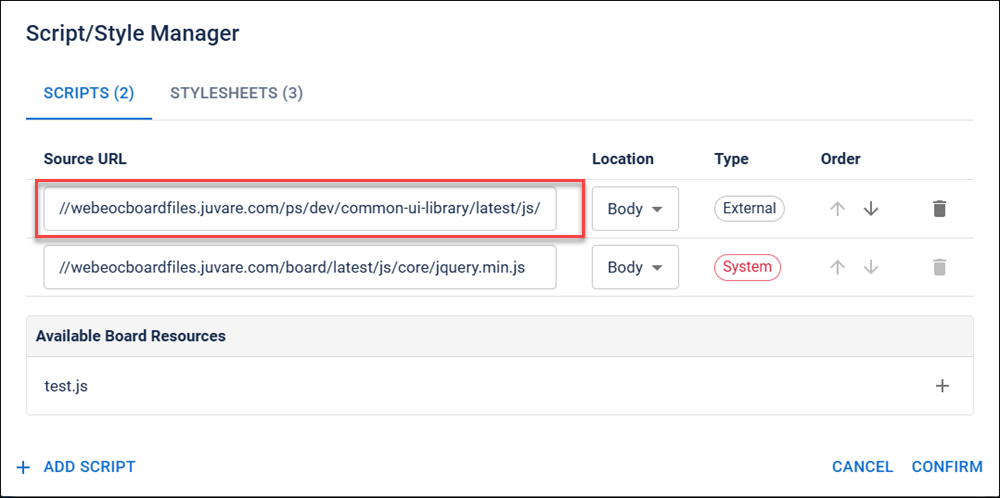
The Scripts & Styles component provides you with a coding shortcut. It lets you view and modify the scripts and styles used in the board without opening the board in Code mode.
For example, you can quickly update versions of a script by changing the Source URL for that script.
The Scripts & Styles component is supported in the Input, Details, List, History, and Dashboard views and is found in the Toolbox section of the Components tray.
See Add Board Components for details about adding components to a view.
To use the Scripts & Styles component
On the Component tray, in the Toolbox section, click the Scripts & Styles component. The Script/ Style Manager dialog opens.
Perform these actions on the appropriate tab:
-
View and edit information about the scripts and styles used in the board.
-
Rearrange the order of scripts and styles.
-
Delete External scripts and styles.
You cannot delete scripts or styles that have a type of System.
-
Add scripts and styles.
This dialog also lists the relevant board resources. The Scripts tab lists JavaScript resources. The Styles tab lists CSS resources.
Related Tasks