Objectives are tasks or duties associated with incident response guides A predefined guide containing objectives, tasks, files, and resources for a specific incident. (IRGs) to direct participants’ actions and help resolve the situation. In addition to naming and describing objectives, it is necessary to assign objectives to an ICS Chart position or the incident as a whole.
-
eICS allows you to create multiple objectives with the same name; however, you should check your local policies to find out if it is required to identify objectives with unique names.
-
In Planning, objectives assigned to the incident, rather than an ICS Chart position, appear on the General (in the Incident Objectives section) and Objectives drawers of the IRG.
To edit an objective
-
Point to Planning and select Plan Summary.
-
From Summary for, select the domain or facility.
-
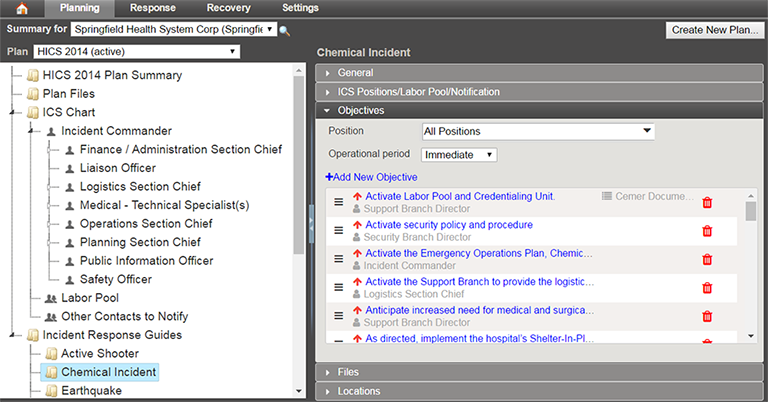
On the left, select the appropriate IRG (for example, Active Shooter or Chemical Incident).
-
Click the Objectives drawer.
-
Locate the objective, and click its name. The Edit Objective window opens.
-
Take any of these actions.
Edit objective actions Action
Procedure
Change the name and/or description
In the Objective and/or Description field, enter the information you want associated with this objective.
Assign the objective to someone else
In the Assigned to list, select a different position or Incident Level.
Change the priority
In the Priority list, select the urgency with which you want the objective completed.
Change the operational period
A defined time frame for executing incident objectives and assignments.In the Operational Period list, select the period in which you want the objective completed.
The menu only displays default operational periods. If you use Custom Operational Periods, review the mapping between your custom operational periods and the default operational periods.
Change or remove the template,
In the Template list, select a different template or No template.
-
Click OK.
To delete an objective
-
On the Home page, point to Planning and select Plan Summary.
-
From Summary for, select the domain or facility.
-
On the left, select the appropriate IRG.
-
Click the Objectives drawer.
-
Locate the objective and on that row, click the delete icon. The Delete Objective window opens.
-
Click Yes.
Related Concepts