Incident response guides A predefined guide containing objectives, tasks, files, and resources for a specific incident. (IRGs) are plans that describe how to respond to a specific type of incident. Response guides are created or copied by Domain or Facility Administrators during the planning phase to clarify the positions, contacts The internal and external people that participate in, might be affected by, or need to be notified about an incident., and actions that are expected in relation to an incident.
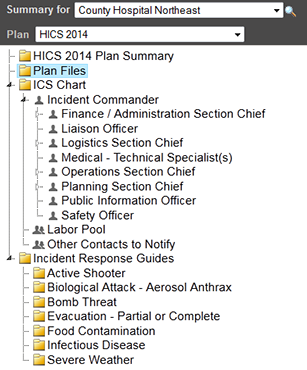
IRGs are accessed through the Plan Summary page. If your facility is authorized to edit its plan, administrators can add or delete IRGs, copy IRGs to create new ones, specify general details, identify ICS positions, and add and maintain objectives, files, and locations.
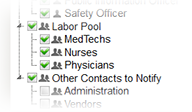
IRGs must have at least one ICS position associated with them. When selecting positions to associate with an IRG, the Labor Pool and Other Contacts to Notify groups Comprised of accounts with certain shared characteristics, such as role or location, but not necesarily employer. are expanded so you can view any subgroups. Selecting the checkbox for a group, such as Labor Pool, does not automatically select its subgroups. If you want a group and all its subgroups associated with an IRG, you must select each subgroup individually.
You can add objectives and assign them to a position or the entire incident. Incident-level objectives appear in the Incident Objectives section of the IRG's General tab.
Related Concepts
Related Tasks