Regional Logon Messages
Regional Administrators can create logon messages Login messages created by Regional Administrators that users see when when they log in to EMTrack. that appear to users when they log in to EMTrack. You may create informational messages that require no interaction or statements/policies that require user acceptance.
Administrators can optionally create one or more messages for their region. Since this a regional setting, active messages appear to all users in the region.
Types
Acceptance Required
The administrator can require users to accept the policy statement before they can access EMTrack. If the user rejects the statement, they cannot log in; the Log In page re-opens.
The system saves the following with the user's EMTrack account: date and time of acceptance (or rejection) and the version of the statement. An administrator can view users' acceptance or rejection of the policy statement both online and in a report (PDF).
Informational
The administrator can create messages that are informational and do not require user acceptance. The system does not track interaction with these messages.
Logging In
After the user enters a valid login email and password in the EMTrack Log In page, the next page shows the active statement or message. If the user is required to accept or reject it each time they access EMTrack, the page appears every time the user attempts to log in.
If the statement or message requires acceptance, it contains the Accept and Reject buttons. If the message does not require acceptance, the page shows the OK button.
If the user rejects the statement, the Log In page re-opens. The statement will appear each time the user attempts to log in to EMTrack until that user accepts it.
Features
Regional Administrators can:
-
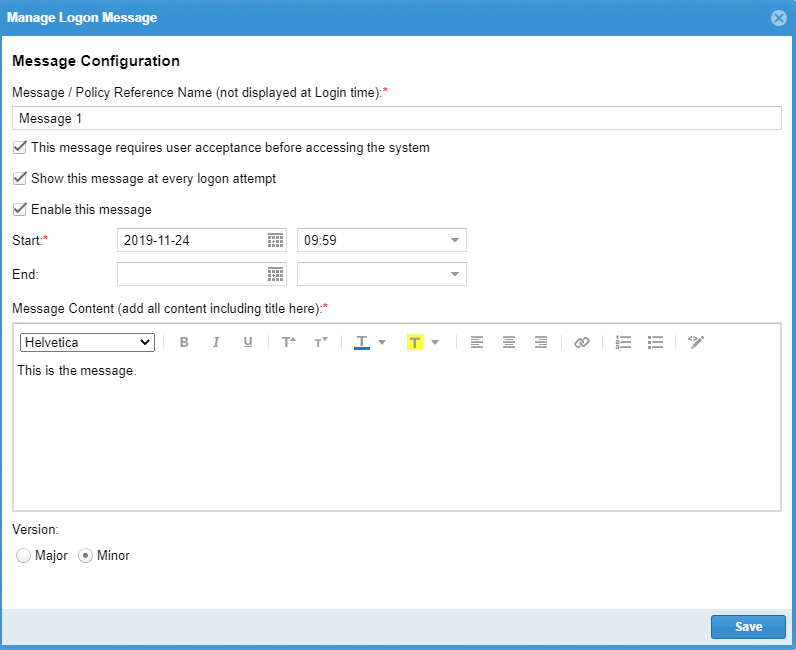
Set a start and end date for each message; when the end date is reached, the message no longer appears to users.
-
Format messages, including specifying a font family, style (regular, bold, italic), and size.
-
Enable and disable each message. Disabled messages are retained in the system, but do not appear to users.
-
Enable or disable the acceptance feature for each message. Enabling requires users to accept the message before they can access EMTrack.
-
Require that a user accept a message each time they log in.
-
Edit messages. The system automatically assigns a version number to each saved revision. The administrator can specify it is a major or minor version.
-
Delete messages.
In addition, note the following:
-
The system always posts the most recent version of each message. Users who have accepted a previous version of the policy statement will be required to view and accept each new version.
-
If the administrator creates multiple policy messages, those that require acceptance appear to the user first (in the order in which the administrator created them), followed by those that do not require acceptance.
-
The system tracks user acceptance only at the user account level.
-
Administrators can run a report showing the region's users and their acceptance or rejection of policy messages. Refer to Track Policy Statement Acceptance.
Related Concepts
Related Tasks