These notes describe updates in the WebEOC Nexus 10.18 release scheduled for April 8, 2026. More information is available in this help center or by contacting the Juvare Support Center at +1 (877) 771-0911 or support@juvare.com.
New Features
Board Comments
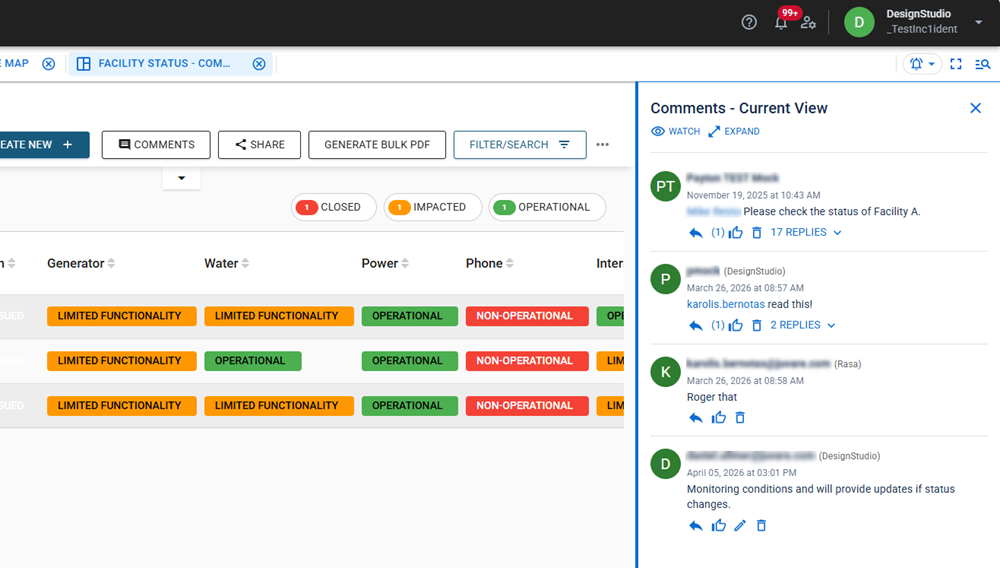
We’ve introduced a new board comments feature that enables teams to communicate and collaborate directly within boards. With board comments, you can have conversations where the work is happening, so there is no need to switch tools or lose context.
Key Features
-
Start conversations by adding comments in the context of the current view, using a rich text editor.
-
Tag teammates or entire positions using @ mentions to ensure the right people are notified.
-
Stay informed by watching a board's comments and receiving notifications when new comments are added.
-
React to comments with likes to quickly acknowledge the message or show agreement.
For more information, see Board Comments.
Share Links
The new share links feature makes it easy to direct others to exactly what you’re seeing in WebEOC Nexus boards. It allows you to generate and share a direct URL to a specific board view in context. When recipients open the link, they’re directed to the exact location, reducing back-and-forth and eliminating the need for manual navigation.
For more information, see Share Board Links.
JAI Button on Text Areas on Boards
If you have purchased the Juvare AI Assistant (JAI Juvare's AI Assistant An intelligent, natural-language interface designed to streamline information retrieval within WebEOC Nexus, providing concise, data-driven responses sourced directly from board views, while enforcing existing administrative controls and data permissions.), rich text editors in boards and notifications now include built-in writing assistance. This feature requires no board configuration and allows you to compose, rephrase, adjust tone, apply styling, and reformat content into tables as you work.
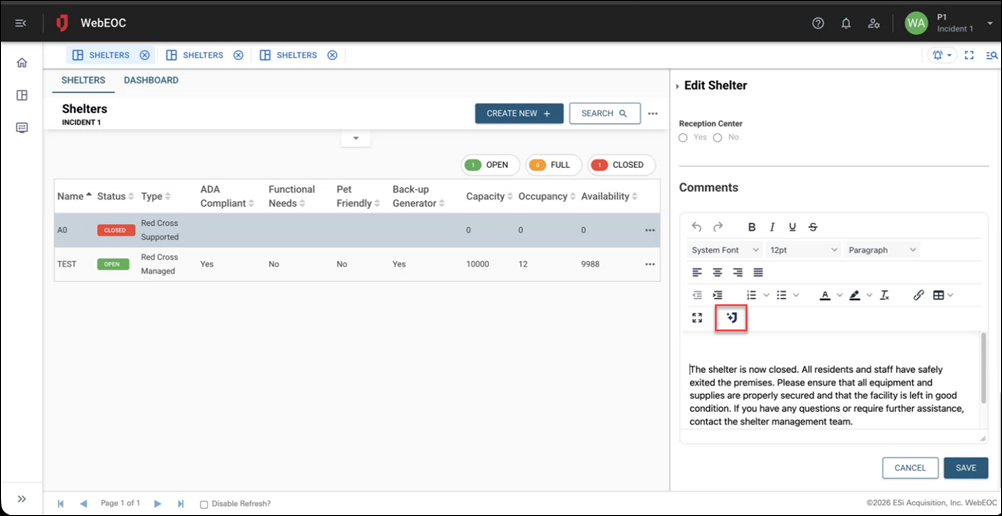
When you highlight text and click the JAI icon, a window opens where you can use prompts so that JAI can improve your content.
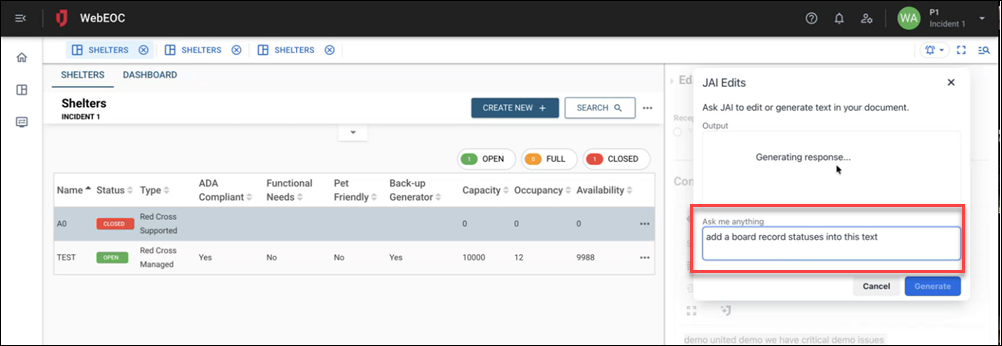
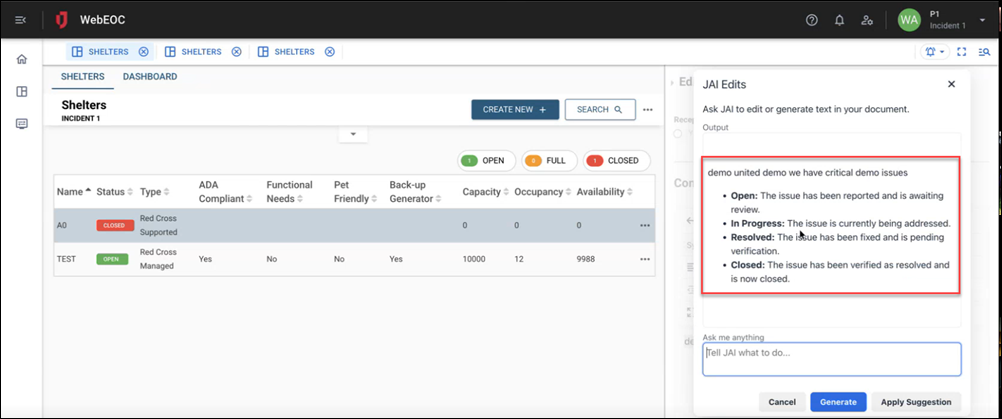
For more information, see JAI-Assisted Writing.
User Inactivity Lock Alert
Users now receive proactive alerts when their account is at risk of being locked due to inactivity. This gives users the opportunity to log in and prevent their account from being disabled, reducing administrative overhead for account reactivation requests. Two settings have been added to the System Settings General tab in the Admin View to configure this feature:
-
Enable Inactivity Alert: Select the checkbox if users should receive an email stating that their account is about to be locked because the user’s inactivity is about to pass the Inactivity Lockout Threshold. The email message tells the user that their account is about to become inactive and provides the number of days remaining until it is locked. It also includes a link to log in to WebEOC Nexus.
-
Inactivity Alert Reminder Period: Sets the number of days before an account is locked that the Inactivity Alert is sent.
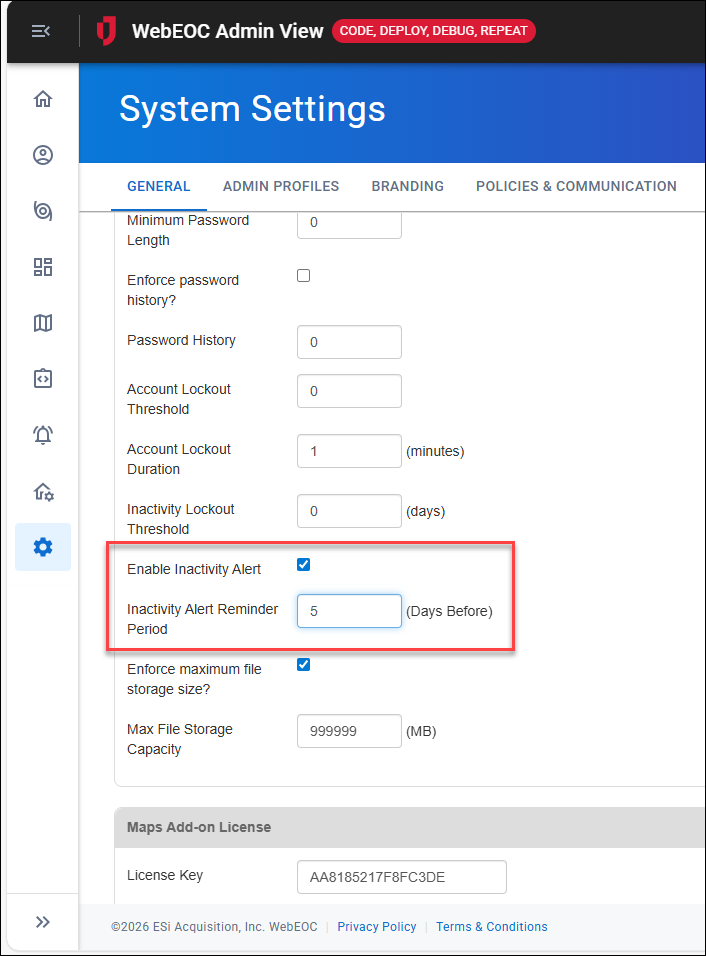
See Configure User Lockout Settings for details.
This feature was suggested by a client through the Juvare Ideas Portal. We welcome your feedback.
WebMaps Username/Password Authentication
WebMaps now support username/password authentication in addition to OAuth. This enables integration with ArcGIS mapping services and partner providers (such as IceEye) that use token-based authentication via the ArcGIS REST API GenerateToken endpoint.
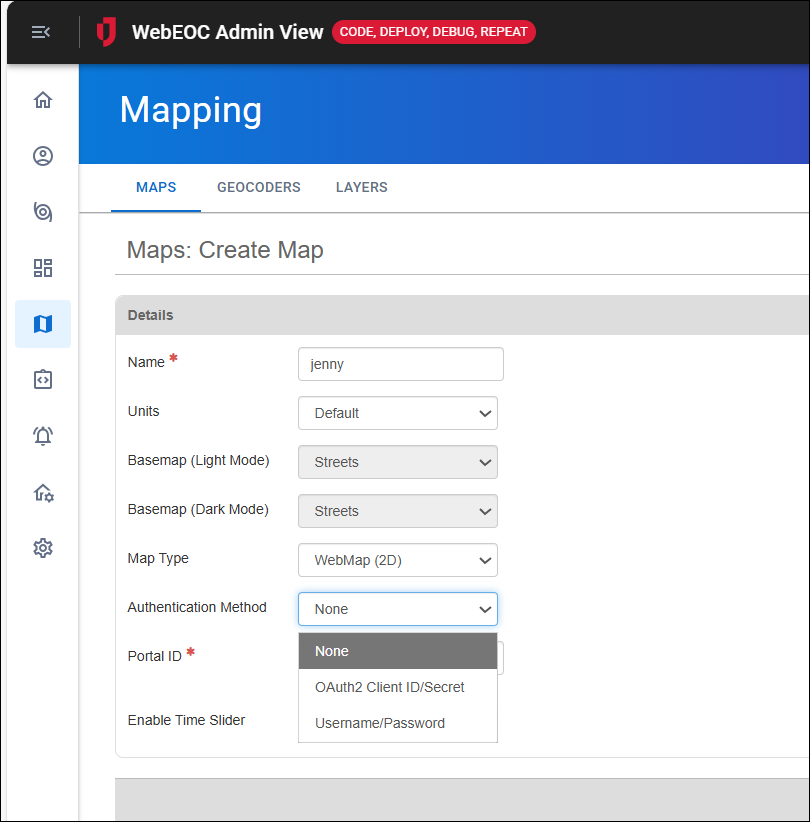
See Create a Map for details.
Enhancements
-
Pending View Refresh Cleanup: Added automatic periodic cleanup of stale pending view refresh records with a 30-day retention policy. This resolves performance issues on instances with large record accumulations (740k+), particularly in environments where incidents are frequently opened and closed.
-
Plug-in Label Update: "Ad Hoc Alerts" has been renamed to "Alerts."
Resolutions
-
Rich Text Editor in Alerts: Previously, some features were unavailable in the Rich Text Editor on the Alerts pages, used in the Long Message box on the Create Notifications page. If you clicked the paperclip icon to either upload a file or attach a file from Documents, no options were displayed. Now, the Upload File or Select in File Library options display when you click the icon in the Long Message box.
-
Board Field Name Encoding: Fixed an issue when field names containing _x were incorrectly encoded as _x005F_x, causing display issues in views. Now, board fields with _x characters in their names are returned correctly in board data XML.
Board Refresh Issues
-
Board refresh after filter update or clear: Fixed an issue where boards displayed stale data until you manually reloaded the board. Now, the list of records refreshes automatically after you update or clear filters.
-
Board refresh when accessed through viewlink target=window: Previously, incident-dependent boards opened in new windows with a viewlink that used the target=window attribute showed stale data because they bypassed the SaaS wrapper's refresh mechanism. Now, boards opened via viewlink target="window" receive real-time data refresh events.
-
Filter criteria groups breaking auto-refresh: Fixed an issue where list views with updatesection="true" stopped auto-refreshing when the default filter contained empty criteria groups. Now, list views auto-refresh as expected, even when the default filter contains empty criteria groups.
Alerts
Enhancements
JAI Assistance (JAI) for Writing Alerts Messages
If you have purchased the Juvare AI Assistant, this feature can now be used to help you compose an alert message or email content in the Long Message field.
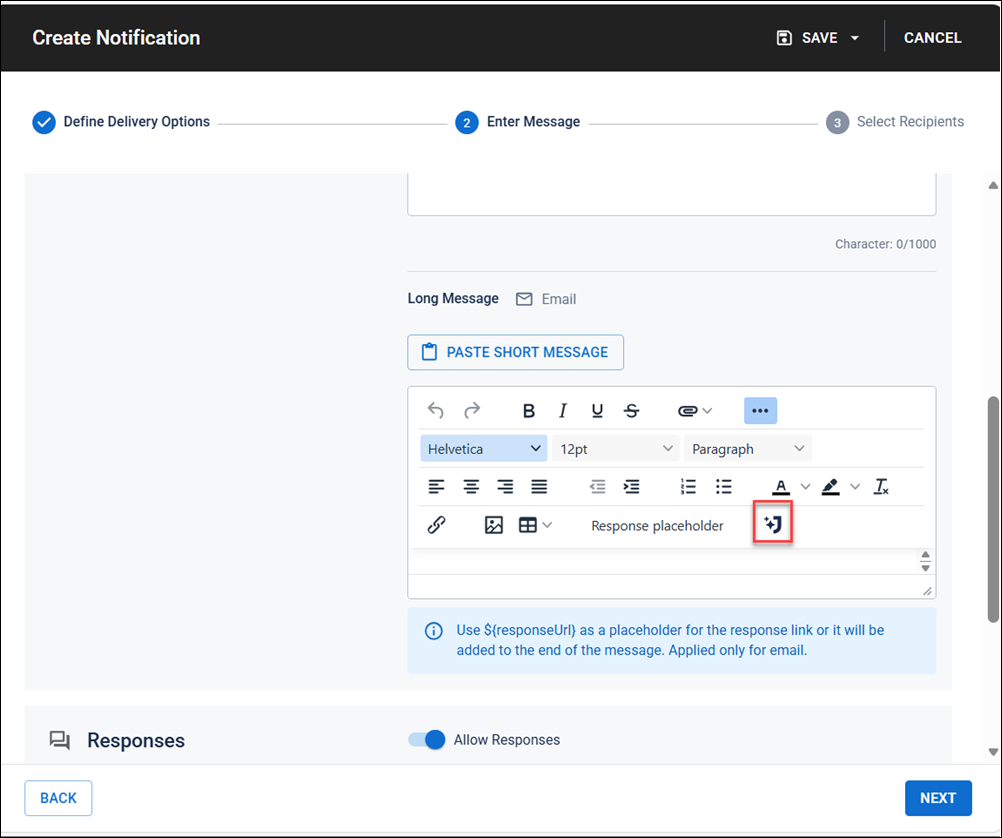
See Get Started with JAI for details.
Streamlined Alerts Workflows Related to Saving
We have simplified the steps for saving an alert as a template when sending alerts, reducing friction during time-sensitive notifications. For details about the updates, see Create an Alert.
Resolution
Translations. Fixed broken translations across the alert creation wizard steps.
Contacts
Enhancements
-
When searching for accounts, you can use the new Any/All filter for groups. If you select Any, if a user is a member of one or more of the selected groups, they will be included in the search results. If you select All, a user must be a member of all of the selected groups to be included in the search results.
-
When searching for accounts, you can search by email delivery issues. The options are Invalid Address, Marked as Spam, and Unsubscribed. The system checks for eemail delivery issues once daily.
-
Organization administrator permissions to update the profile picture associated with an account have been expanded. Previously, organization admins could only manage profile pictures for accounts that ware in an Accepted status. Now, organization admins can manage profile pictures for members in any status.
Resolutions
-
Fixed an issue where the primary organization chip still displayed on the Accounts panel after the user was removed from the organization. Now, the chip no longer displays when a user is removed from the primary organization.
-
Fixed an issue where the account filter turned on by the Only Primary Organizations toggle did not work. Now, only primary organizations display when the toggle is switched on.
-
Fixed an issue that occurred when a user with manage accounts permission updated an account. That user was removed as a member of all organizations. With the fix, account membership in organizations is not affected when an account is updated.
-
Fixed display and save issues with organization description fields.
Previous Versions
Release notes for previous versions are available here.