EMResource 4.43 Release Notes
These notes describe updates in the EMResource 4.43 release scheduled for Wednesday, June 24, 2026. More information is available in this help center or by contacting the Juvare Support Center at +1 (877) 771-0911 or support@juvare.com.
New Features
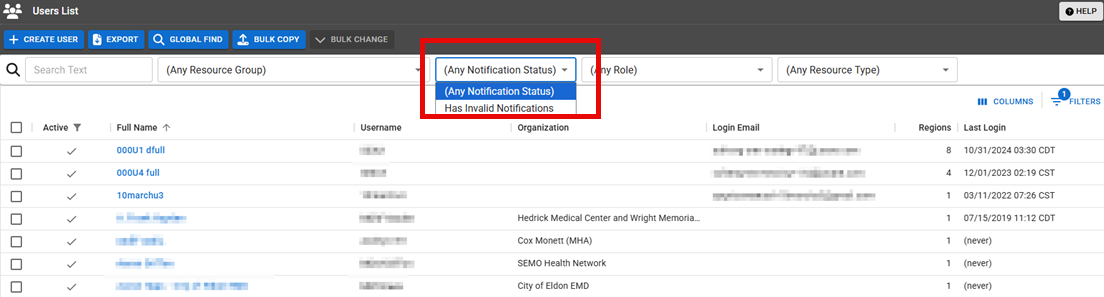
New Filters for Invalid Notification Addresses and Phone Numbers
New filters have been added to the User List page to allow for the identification of invalid notification addresses and phone numbers, for example, an invalid email address, phone number, or pager number. The Invalid Notification column is available but is turned off by default. Additionally, the Invalid Notification filter is available and works in conjunction with other available filters.
Further, when a user is created with an invalid email address, phone number, or pager number, Invalid address and Invalid statuses are displayed next to the corresponding email and phone/pager contact methods when saving.
For more information about the invalid notification filters, refer to Edit the Users List; for more information about the invalid statuses when creating a user, refer to Create a User.
This feature was suggested through the Juvare Ideas Portal. We welcome your input to improve our products.
User Audit Report Updates
The User Audit report Provides specific information about statuses and details, notifications, forms, templates, snapshots, and roles/rights in EMResource. now displays the following columns in the report:
-
Created At: The date when the user was created.
-
Organization: The organization to which the user belongs.
-
Last Updated by Username: The username of the user who last updated the user.
-
Last Updated by Full Name: The full name of the user who last updated the user.
-
Last Updated At: The date when the last update was made.
-
Last Update Type: What was last updated for that user, for example, added or removed a resource, changed roles
Assigned to determine which features and functions are available to users., and so on.
For more information about the User Audit report, refer to User Audit Report.
This feature was suggested through the Juvare Ideas Portal. We welcome your input to improve our products.
Bulk Upload Template Updates
When working with the Bulk Upload Template, you can now select which status types Custom fields that track information about resources. This is region-specific and are unique fields. to include in the template. Only active status types that you can update are included in the list, and all status types are selected, by default.
Additionally, an Advanced Options section has been added, with a checkbox to use XML Names for status types that are associated with a Standard Status Type. Using XML Names can prevent upload status errors if an admin changes the name of a status type.
For more information about the Bulk Upload Template or how to update status types in bulk, refer to Bulk Status Upload.
User Creation Messaging Updates
The email notification sent when a new user is created now includes the name of the administrator who created the user. These emails are sent to users who have the role selected in the Role to notify on new user added to Region field in the Regions page.
For more information about user creation, refer to Create a User.
This feature was suggested through the Juvare Ideas Portal. We welcome your input to improve our products.
Resolutions
-
Resolved an issue where a custom view
A personal view that displays information about specific resources. in the Bulk Upload Template did not show the Add Resource button before the first section was added. -
Resolved an issue where the search filter dropdowns on the User List page were not sorted alphabetically when searching by Roles.
-
Resolved an issue where numeric status types were not sorted by their numeric value in dashboard
Allow people to quickly review important information about resources and status types, and may be personal, shared, or global. widgets Components added to dashboards to organize, analyze, and present information about resources and status types.. -
Resolved an issue where attachments added to scheduled events when they were created were not available for download.
Previous Versions
Release notes for previous versions are available here.