Configure Process Permissions
When the Requests, Inventory, and Deployments board is imported, two process permissions A setting that grants an organizational group access to a process flow's views. are automatically created in WebEOC Nexus:
-
Agency: Establishes a relationship among positions for the purposes of filtering requests, inventory, and deployments.
-
RID Requesting: Used to create a request routing hierarchy. Must be used with the Permissioned Assignment board permission tag when assigning the RID board.
While these are the only two process permissions needed for this example, you can create additional process permissions for a more complex process, or to create processes for other boards. See Create Process Permissions for details.
To configure process permissions
-
In the main menu, click the accounts icon
 . The Accounts page opens.+
 -
Click the Groups tab.
-
Locate your organizational groups
A cluster of positions that, with process permissions, defines the structure for process flow., such as County – Sebastian – Controller. -
Click Enabled to the right of the organizational group you wish to edit. The Edit Process Permissions dialog opens.
This dialog lists all process permissions, and lets you add organizational groups to each process permission.
-
Locate the Agency process permission.
-
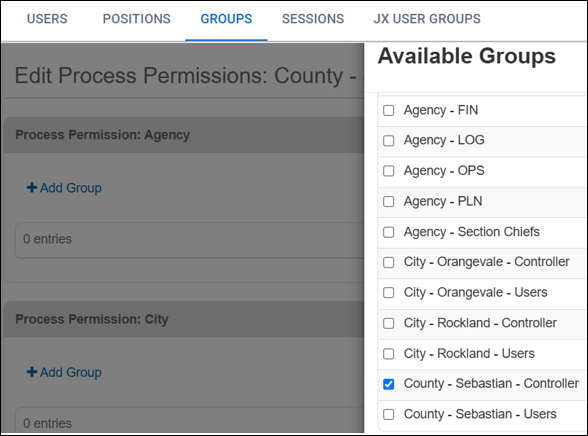
Click Add Group, select the group of the same name, and click Add.
Example If you are editing the County – Sebastian – Controller organizational group, add the County – Sebastian – Controller organizational group to the Agency process permission.
-
Scroll down and locate Process Permission: RID Requesting.
-
Click Add Group.
-
Select the checkbox next to each organizational group that these users are allowed to route requests to.
For example, County – Sebastian – Controllers is comprised of the Sebastian County Logistics Section Chief. This group is allowed to route resource requests to any position inside Sebastian County or to any Logistics Section Chief in the cities. In this case, we would add:
-
County – Sebastian – Users (for all County positions)
-
City – Orangevale – Controller (for the Orangevale Logistics Section Chief)
-
City – Rockland – Controller (for the Rockland Logistics Section Chief)
-
-
Click Add .
-
Scroll to the bottom of the page and click Add.
-
Repeat this process for all remaining organizational groups, ensuring that each one has both an Agency group assigned of the same name and one or more RID Requesting groups assigned based on allowed routing.
Next, test and validate your configuration.