Use Process Permissions to Restrict Data on a Board
When process permissions A setting that grants an organizational group access to a process flow's views. are used to restrict data on a board, users view information that is relevant to their position or organizational group A cluster of positions that, with process permissions, defines the structure for process flow. only. For example, you can create a process permission to restrict data on the Activity Log on the Event Reporting board to all positions in a section, such as Logistics, Finance, or Planning. When the process permission is configured, users will only see data on the Activity Log for their section, as defined by their position.
To set up this type of process permission, you could:
-
Create organizational groups for each section.
-
Create a process permission with the name PP – Event Reporting – NOS Positions.
-
On the Groups page, for each organizational group for the section, assign the PP – Event Reporting – NOS Positions process permission.
-
On the Board Editor: Event Reporting page, build a view filter on the Activity Log Display view for the position_name using the process permission as the criterion.
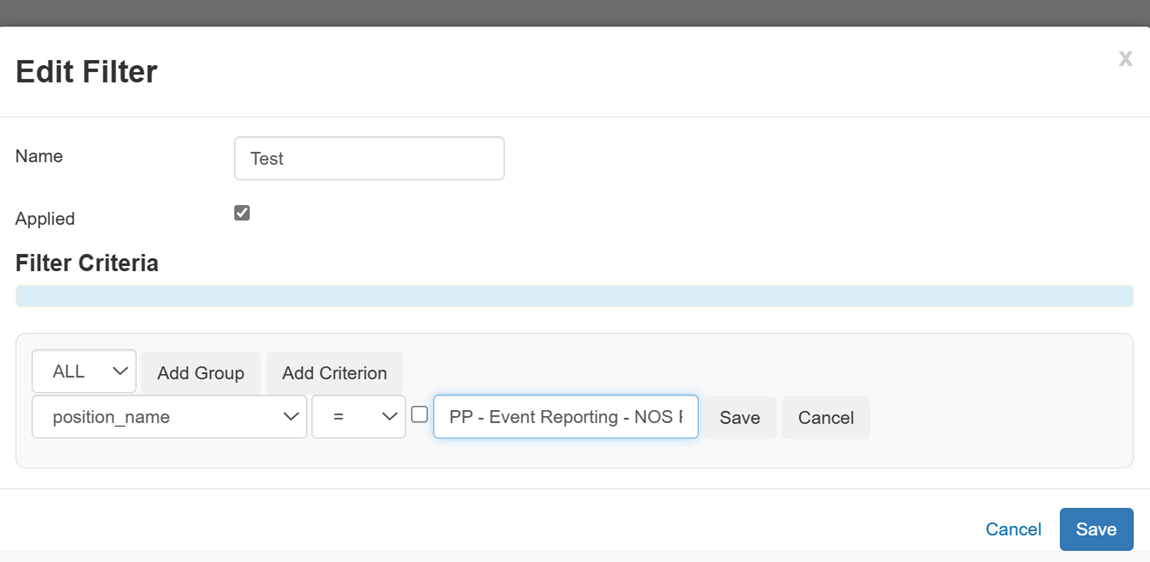
When users access the Activity Log, only records related to other users in their section display.