Upload a Certificate
.Uploading a digital certificate allows WebEOC Nexus to access IPAWS Integrated Public Alert and Warning System. A simple, flexible tool that can be used by the alerting authorities to send emergency messages to the general public. The certificate and all supporting information are provided by FEMA after your application is approved.
To upload a certificate
-
In the main menu, click the integrations icon
 . The Integrations page opens.
 -
Click the IPAWS Messaging tab.
-
Click the Actions drop-down list and select Set mode.
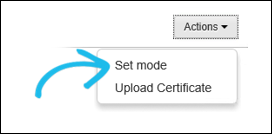
You must select a mode before uploading a certificate.
-
In the Set Mode page, select the applicable mode and click Save.
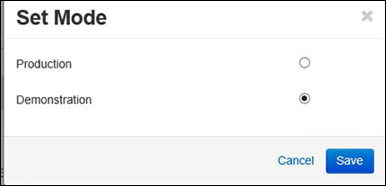
Read more about modes to help you select the appropriate option.
-
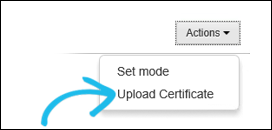
Click the Actions drop-down list again and select Upload Certificate.
-
On the Upload Certificate page, enter information in the COG ID, Keystore, Key, and Logon User fields.
All fields are required, and the information for such fields is provided by FEMA.
-
For the JKS Certificate field, click Browse and select the certificate in the .jks format from your computer.
-
Click Save.
After you upload the certificate, the COG Profile section is filled with the information about the general capabilities of your system. These capabilities are determined by the agreement between your agency and FEMA.
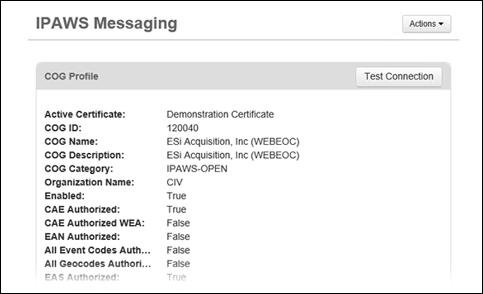
After you upload a certificate, you can test the connection to verify that it is working properly.