Configure the Rave Alert Extension
For a user to initiate a Rave Alert notification, the user account name between WebEOC Nexus and Rave Alert must match. WebEOC Nexus users without an identically named account in Rave Alert will encounter an error if they attempt to initiate a Rave Alert notification.
To configure the Rave Alert Extension
-
In the main menu, click the integrations icon
 . The Integrations page opens.
 -
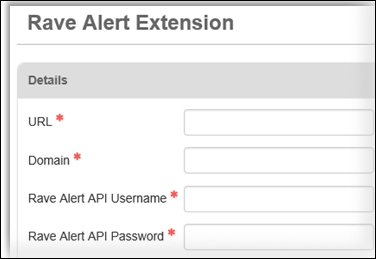
Click the Rave Alert Extension tab. The Rave Alert Extension page opens.
-
Enter information in the fields.
-
URL: Web address for Rave Alert API
-
Domain: Domain name
-
Rave Username: Provided Rave Alert API username
-
Rave Password; Provided Rave Alert API password
-
-
Click Save.
After linking your WebEOC Nexus and Rave Alert accounts, you must have a Rave-enabled board to be able to send an alert from within WebEOC Nexus. See Enable the Rave Alert Extension in a WebEOC Nexus Board for details.
Download the Rave Alert Extension Board 2.0.0.web, a basic Rave Alert board that you can then import as a new board to get you started. This board is an example board, and not the definitive template for building this type of board.