Archive, Restore, and Delete Positions
As an administrator, you can archive, restore, or permanently delete positions. Archiving and restoring positions provides a safer alternative to deleting them. Archiving allows positions to retain history and to be restored, along with their previous assignments, if needed.
Ensure that the position’s users are assigned to another position with the access they require before archiving or deleting the position.
Archiving, restoring, and deleting are all tracked as events in the audit log Tracks and records administrative events that occur in WebEOC Nexus; supports monitoring and assessment of administrator/user activities; aids in troubleshooting..
As a recommended approach:
-
Archive a position instead of deleting it to keep the position history and assignments recoverable.
-
Review archived positions regularly to maintain clean records.
When a position is archived, the position is:
-
Unassigned from all organizational groups
A cluster of positions that, with process permissions, defines the structure for process flow. and feature groups. -
Unassigned from all users.
-
Removed as an option in all drop-down lists, including the Profile drop-down in the top right and the Select Position and Incident dialog that may be visible during the login process.
-
No longer visible in the platform or on reports.
-
Removed from board notifications.
-
Removed from the Positions tab.
-
Not selectable as board-notification recipients or scheduled-notification recipients. The recipient pickers for each of these notification types do not include archived positions.
-
Displayed on the Archived Positions page.
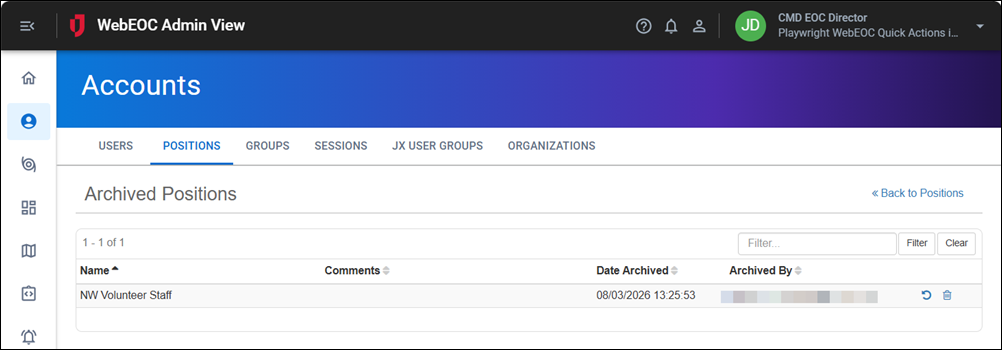
When a position is restored, the position is:
-
Assigned to previous organizational groups and feature groups.
-
Assigned to previous users.
-
Available as an option in all drop-down lists, including the Profile drop-down in the top right and the Select Position and Incident dialog that may be visible during the login process.
-
Available on the platform or in reports.
-
Available on the Positions tab.
When you restore a position, board notification configuration is not updated. In other words, you must restore position assignments to board notifications manually.
To archive, restore, or delete positions, you must be either:
-
An Account Type of Full Administrator
An account type with access to all features and functions in the Admin View.. Users of this type can archive and restore any position. -
A Partial administrator
An account type with access to a configurable subset of administrative features, set via an admin profile. of an Admin Profile A tool that lets full admins configure and assign permissions to specific users who have a Partial Administrator account type. that has the Positions Admin Manager assigned with the Delete permission enabled. See Admin Profiles for details.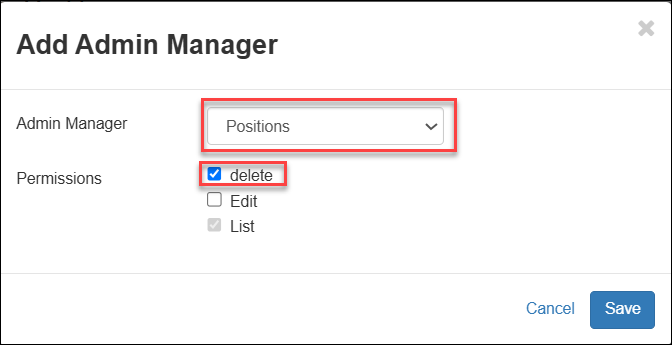
Archive a Position
See the introduction to this page for the changes that occur when a position is archived.
To archive a position
- Access the Admin View.
-
In the main menu, click the accounts icon
 . The Accounts page opens.
 -
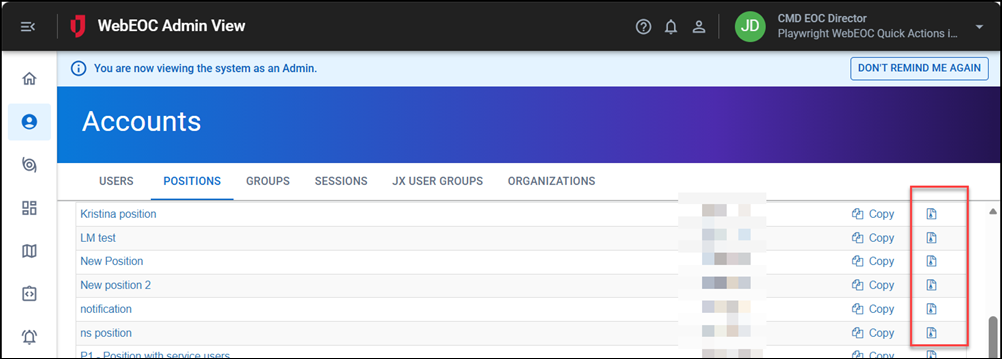
On the Positions tab, on the right of the position to be archived, click the Archive icon.
-
Click OK to the confirmation message.
Restore a Position
After a position has been archived, it can be restored. See the introduction to this page for all of the changes that occur when a position is restored.
To restore an archived position
- Access the Admin View.
-
In the main menu, click the accounts icon
. The Accounts page opens.
-
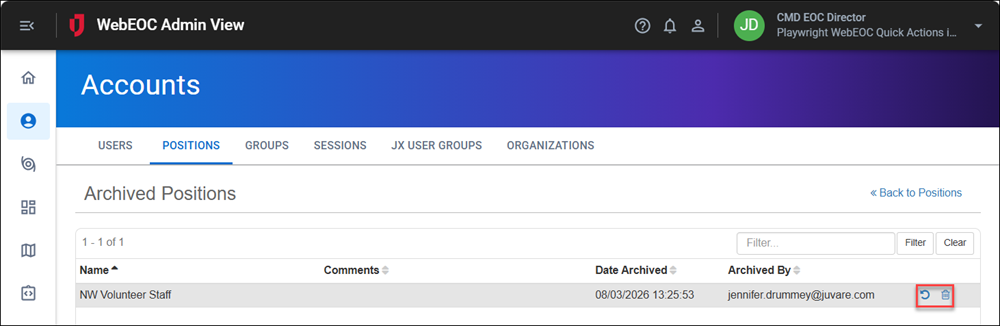
On the Positions tab, click the Actions button and select Archived Positions.
-
For the position to be restored, click the Restore icon to the left of the Delete icon.
-
Click OK to the confirmation message.
When you restore a position, the board notification configuration is not updated. In other words, you must restore position assignments to board notifications manually.
Delete a Position
After a position has been archived, you can permanently delete it.
As a recommended approach, permanently delete a position only when compliance or policy requires full removal.
Deleting a position permanently removes it from WebEOC Nexus. This action cannot be undone.
To delete an archived position
- Access the Admin View.
-
In the main menu, click the accounts icon
. The Accounts page opens.
-
On the Positions tab, click the Actions button and select Archived Positions.
-
For the position to be deleted, click the Delete icon on the far right.
-
Click OK to the confirmation message.