View a Status as a Subscriber
If you do not have WebEOC version 7.3 or later, you cannot access this feature. If the publisher did not publish a board in WebEOC 7.3 or later, information may be missing. If your WebEOC Fusion server is not at version 2.0 or later, you cannot access this feature.
To view a subscription board status as a subscriber
-
In the main menu, click the workflows icon
 . The Workflows page opens.
 -
On the Boards page, select the appropriate subscription board.
-
On the Board: Edit Board page, click Status in the WebEOC Fusion subsection.
-
On the [Board] Status page, the Local Subscriber Information section shows all of your information as the publisher. The Subscribers section contains a table with subscriber details. For information about each column in the table, see the descriptions below.
Status information is available for subscribers who are subscribed to the board. Information on subscribers using WebEOC versions earlier than 7.3 is not available or may be inaccurate.
Status Table Columns: Descriptions
Subscriber
The name of the subscriber. This column always populates regardless of the subscriber's version of Unified Command Platform or whether it is subscribed to the board.
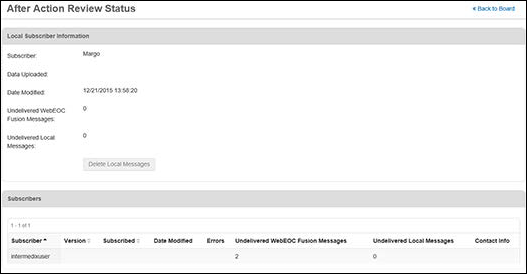
Version
The version of Unified Command Platform used by the subscriber.
Subscribed
If the subscriber is subscribed to the board. Displays a red check mark if subscribed.
The Version and Subscribed columns only populate for subscribers who have WebEOC 7.3 or later and have subscribed to the board.
Date Modified
The date the board was last modified or updated for the subscriber.
Errors
Populates if subscribers have had issues subscribing to your board or receiving updates to the board structure.
Undelivered WebEOC Fusion Messages
The messages waiting on the WebEOC Fusion server for the subscriber.
Contact Customer Support before deleting undelivered messages.
Undelivered Local Messages
Message for this subscription board that cannot be processed by the subscriber's Unified Command Platform.
Contact Customer Support before deleting undelivered messages.
Contact Info
The subscriber's contact information as entered for the subscriber on the WebEOC Fusion server.
Related Concepts
WebEOC Fusion Subscription Boards Guide
Reference Materials
Related Tasks
Subscribe to a Regional Incident