On the Incident Dashboard, the Map tab lists and displays locations that were set up during planning, through the IRG, and/or added during response. Basic information and the option to edit locations are easily accessed by clicking the location icon.
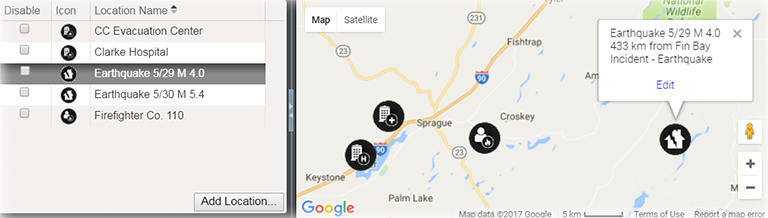
Elements
| Element | Description | Actions |
|---|---|---|
|
List |
Locations for this incident |
|
|
Map |
Incident location |
Edit Location When shared with JX, the Incident location type must be defined. |
|
Details |
|
Set Lat/Long from Address |
Options
Note the following about map features:
-
Google™ Controls – The map employs standard Google controls; use these to move the focus in the map, zoom in and out, and view variations on the map, such as a satellite or hybrid view.
-
Icon – Each type of location is associated with a particular icon. This icon marks the location in the map.
-
Latitude and Longitude – When adding or editing a location, you can change its position on the map by dragging the icon on the map to a new place. Doing this automatically updates the Latitude and Longitude fields, but not the address fields. Remember to update the address as well by clicking the up arrow icon.
When shared with JX, the Incident location type must be defined.